

Riverside review
Per-guest 4K local recording metered by separate-track hours a month, with a free plan that is gone on the blog and still on the pricing page
Independent review. If you buy through links on this page we may earn a commission, at no extra cost to you. It never changes our scores — how we test.
ToolsGavel verdict
Riverside pairs the cleanest per-guest recording quality in this comparison with the strongest G2 and Capterra scores anywhere in the category, 4.8 out of 5 on both. The catch shows up on Trustpilot: 3.8 out of 5 from 479 reviews, a full point below the other two platforms, tied to a specific recording-failure complaint and Safari/Firefox friction. There's also no reliable free plan to test it on: Riverside's blog says it was replaced by a card-required 14-day trial that bills automatically on day 15, while the pricing page still shows a limited Free tier, so check what signup offers. Anyone recording multiple long episodes a month should watch the hour caps, since 15 hours on Pro doesn't stretch far.
Audited price: $29/mo billed annually , $35/mo month-to-month (advertised: $35/mo (Pro, billed monthly), $29/mo billed annually) — verified 2026-10-30.
Best for: Podcasters and video creators who want clean per-guest 4K/48kHz local recording, are fine starting on a 14-day trial (a card is required per Riverside's blog) rather than counting on a free plan, and record few enough hours a month to stay inside the 15-to-25-hour paid caps
What we liked
- The 14-day trial gives full access to the Pro, Grow, or Webinar tier you pick, not a stripped-down preview, so you can test real 4K separate-track recording before paying (riverside.com/pricing)
- Per-guest separate 4K video and 48kHz audio recorded locally on each participant's device avoids the compressed, choppy quality of a plain video-call recording, from the entry paid tier up (riverside.com/pricing)
- G2 (4.8/5, 1,757 reviews) and Capterra (4.8/5, 314 reviews) both rate it highest in this comparison, at sample sizes too large to dismiss as noise (G2 / Capterra)
- Hitting a plan's monthly hour cap only blocks new downloads; everything already recorded stays accessible, a softer landing than a hard paywall or a surprise bill (riverside.com/pricing)
- Built-in AI clips, show notes, transcription and filler-word removal cover a chunk of post-production without a second tool (riverside.com/pricing)
What to watch
- Riverside's blog says the permanent free plan was replaced in September 2026 by a 14-day trial that requires a credit card up front and auto-charges on day 15 if you don't cancel, yet its pricing page still showed a Free tier on 2026-11-08, so what you get at signup is uncertain (riverside.com/blog/is-riverside-free, riverside.com/pricing)
- Trustpilot's 3.8 out of 5 (479 reviews) sits a full point below G2 and Capterra, with one specific complaint: "Recordings error after 2 minutes, hours of your time wasted troubleshooting" (Trustpilot)
- A second complaint cluster centers on browser compatibility, specifically Safari and Firefox; Riverside is built Chrome-first by design (Trustpilot)
- Separate-track hours are a hard monthly cap even on paid tiers, 15 hours on Pro and 20 on Grow, which a podcaster recording several long episodes a month can burn through fast (riverside.com/pricing)
- The Webinar tier's jump to $99/mo ($79 annual) buys mostly registration pages and viewer capacity rather than more recording depth, a steep step from Grow's $39/mo for a buyer who only wants the extra hours (riverside.com/pricing)
How much does Riverside really cost?
| Advertised price | $35/mo (Pro, billed monthly), $29/mo billed annually |
|---|---|
| Real monthly cost, billed annually | $29/mo |
| Real monthly cost, month-to-month | $35/mo |
| Month-to-month premium | +21% over the annual-billing rate |
| The billing catch | Separate-track recording is capped at 15 hours a month on Pro, and going over blocks new downloads rather than charging overage until the next cycle. |
| Permanent free tier | Yes |
| Price last verified | 2026-10-30, against the live pricing page at riverside.com |
Model seats and billing cycles for Riverside in the true-cost calculator, or see every audited price in the Pricing Gap Index.
Price watch
Get an email if Riverside's price changes
We re-check Riverside's pricing on a schedule. If the price, the free plan or a verified deal changes, you get one short email. Nothing else.
Riverside records each guest’s video and audio locally on their own device at up to 4K and 48kHz, then uploads the separate tracks after the session, the structural choice that avoids the compressed, laggy quality of a plain video-call recording. Pricing runs $29 to $99 a month for self-serve paid tiers, or custom for the top Business plan. Riverside’s blog says the permanent free plan was replaced in September 2026 with a 14-day free trial of Pro, Grow, or Webinar that requires a credit card up front, but the pricing page still lists a limited Free tier, so expect pricing experiments. G2 rates it 4.8 out of 5 from 1,757 reviews and Capterra 4.8 from 314, both the highest scores in this comparison; Trustpilot sits lower at 3.8 from 479 reviews, as of October 2026.
What Riverside is for
Every participant in a Riverside session records on their own machine, so a dropped connection or a choppy home Wi-Fi signal doesn’t touch the final file quality the way it would on a live video call. Riverside stitches the separate tracks back together after the fact, and that per-guest local capture is the reason podcasters and video creators pick it over recording a Zoom call directly. On top of the raw recording, Riverside bundles AI-generated clips, show notes, transcription and filler-word removal, enough post-production to skip a separate editing tool for a lot of episodes. From the Webinar tier up, it also adds live-streaming and registration pages, so a buyer who occasionally wants to go live doesn’t need a second subscription for that alone.
What you get on each plan
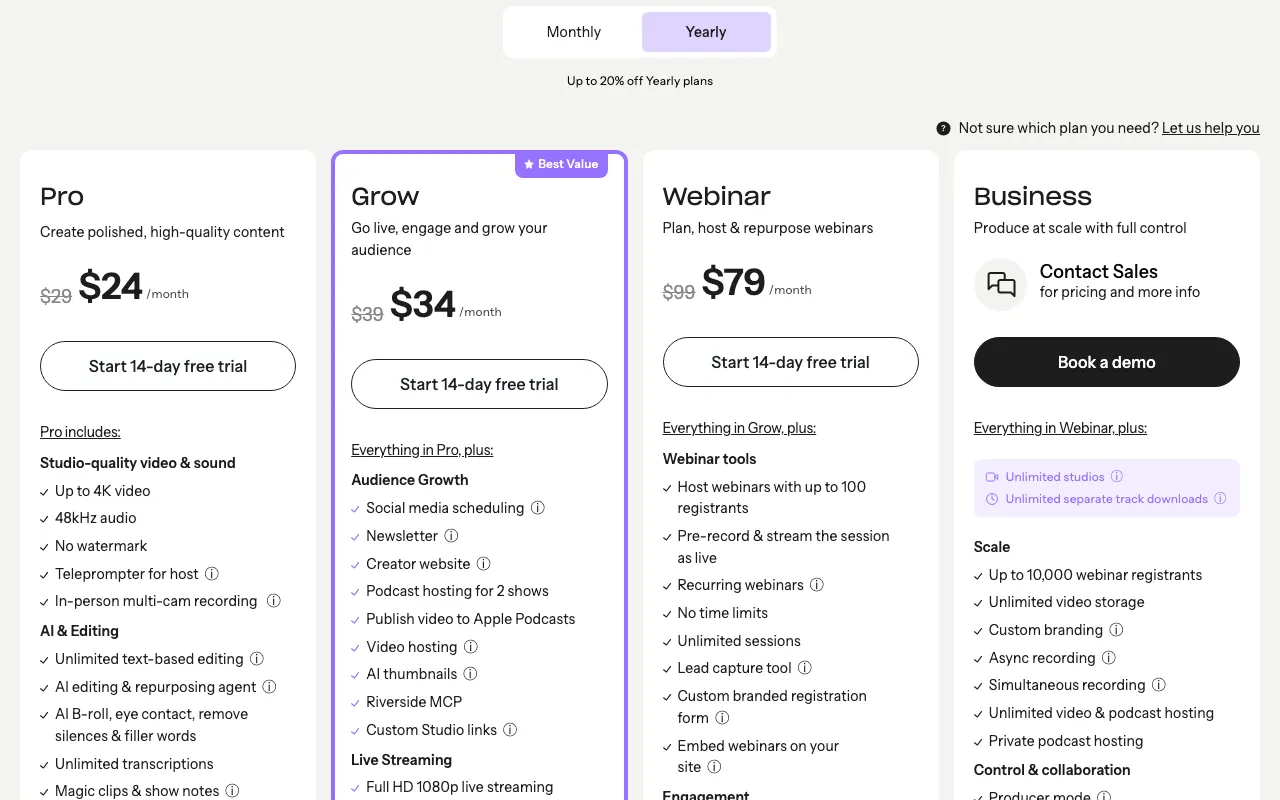
| Plan | Monthly | Annual (per mo) | Separate-track hours/mo | Studios | Max resolution |
|---|---|---|---|---|---|
| Pro | $29 | $24 ($288/yr) | 15 hrs | 1 | Up to 4K (desktop) |
| Grow | $39 | $34 ($408/yr) | 20 hrs | 2 | Up to 4K (desktop) |
| Webinar | $99 | $79 ($948/yr) | 25 hrs | 3 | Up to 4K (desktop) |
| Business | Custom | Custom | Unlimited | Unlimited | Not stated on the pricing page (earlier checks: 4K incl. mobile, unconfirmed) |
Riverside’s blog says there’s no permanent free plan: new accounts get a 14-day free trial of Pro, Grow, or Webinar instead, with full access to that tier’s features. The blog says a credit card is required to start the trial and that it’s charged automatically on day 15 unless you cancel first; the Business plan has no trial. The pricing page, though, still listed a Free tier on 2026-11-08 (2 one-off hours, up to 720p, watermarked) beside a notice that its details may be out of date. Riverside seems to be running pricing experiments, so your signup screen may differ.
The Webinar tier’s extra five hours over Grow is a small jump; the real reason to pay for it is the built-in registration pages and up to 100 webinar attendees, not the recording allowance itself.
What users say in reviews
 G2 and
 Capterra agree closely: 4.8 out of 5 on both, at 1,757 and 314 reviews, with reviewers pointing to recording quality as the main reason they signed up; some older reviews also cite a free plan that Riverside’s blog says it has since replaced with a trial. G2’s star distribution is unusually top-heavy, 94% five-star and just 1% one-star, a cleaner split than most tools in this category.
 Trustpilot tells a different story at 3.8 out of 5 from 479 reviews. One reviewer wrote that recordings “error after 2 minutes, hours of your time wasted troubleshooting,” and a second complaint theme centers on Safari and Firefox compatibility issues. Riverside is built Chrome-first, and using it on Chrome sidesteps most of what the browser-compatibility complaints describe. Weigh the 2,071 combined G2 and Capterra reviews more heavily than the smaller gap on Trustpilot, but know the specific failure mode before trusting it with an unrecoverable live interview.
Who should skip it
Skip Riverside if a text-based editing workflow matters more to you than per-guest recording quality; Descript builds its entire product around editing a transcript and having the audio or video follow. Skip it too if a guaranteed, no-card free plan matters more to you than a fixed-price paid upgrade path; Zencastr still runs a genuinely free tier, though it currently has no self-serve paid plan to grow into if you outgrow that tier’s caps. If live streaming or hybrid webinar hosting is the bigger job and recording is secondary, StreamYard is built the other way around, live production first, recording second. The full comparison, with a badge for each use case, is in Best Podcast and Video Recording Software. And if post-production means patching a flubbed line or dubbing into another language rather than recording a new take, Best AI Voice Generators covers the tools built for that specific job.
Pricing note: Riverside's own pages disagree about a free plan. Its blog (riverside.com/blog/is-riverside-free, last updated September 10, 2026) says the permanent free plan is gone, replaced by a 14-day free trial of Pro, Grow, or Webinar that needs a credit card up front and charges it automatically on day 15 unless you cancel. But on 2026-11-08 the pricing page still listed a Free tier (2 one-off hours of separate tracks, up to 720p, Riverside watermark) and carried a notice that its information 'may not be up to date,' and the pricing page didn't state a card requirement for the trial. Riverside appears to be running pricing experiments, so what you see at signup may differ from this review; treat the trial as the default path and the free tier as possible but unconfirmed. Riverside runs three self-serve tiers plus a custom top tier. Pro runs $29/mo, or $24/mo billed annually ($288/yr): one studio, up to 4K on desktop, and 15 hours of separate-track recording a month. Grow runs $39/mo, or $34/mo billed annually ($408/yr): two studios and 20 hours a month. Webinar runs $99/mo, or $79/mo billed annually ($948/yr): three studios, 25 hours a month, and built-in live webinar hosting with registration pages for up to 100 attendees. Business is custom-priced and quote-only, with no trial, unlimited studios and hours, and registration capacity up to 10,000; earlier checks reported 4K including on mobile, but the 2026-11-08 pricing page doesn't state a resolution for Business, so confirm that with sales. One more oddity on that page: Webinar's annual line read $79/month with a $408 yearly total, which doesn't equal 12 times $79 ($948), while Grow's $408 does match $34 times 12. There's no overage charge for going past a plan's monthly hour cap: hit the limit and you keep access to everything already recorded, you just can't download new separate tracks until the next billing cycle or an upgrade.
Frequently asked questions
How much does Riverside cost?
Riverside runs three self-serve tiers plus a custom top tier. Pro runs $29/mo or $24/mo billed annually for 15 hours of separate-track recording a month at up to 4K. Grow runs $39/mo or $34/mo annually for 20 hours and a second studio. Webinar runs $99/mo or $79/mo annually for 25 hours plus live webinar hosting for up to 100 registrants. Business is custom-priced for unlimited hours and studios. Riverside's blog says there's no permanent free plan and new accounts get a 14-day free trial of Pro, Grow, or Webinar, though the pricing page still lists a limited Free tier.
Does Riverside have a free plan?
Probably not, but Riverside's own pages disagree. Its blog (updated September 10, 2026) says the permanent free plan was discontinued and replaced with a 14-day free trial of Pro, Grow, or Webinar. The trial gives full access to whichever tier you pick, and the blog says it requires a credit card up front and charges that card automatically on day 15 unless you cancel first. The Business plan has no trial. Yet on 2026-11-08 the pricing page still listed a Free tier (2 one-off hours, up to 720p, watermarked) next to a notice that its details may be out of date. Riverside seems to be testing pricing, so confirm at signup.
How many hours of separate-track recording do I get each month?
Pro includes 15 hours a month, Grow 20, and Webinar 25. Business is unlimited but custom-priced. Going over the cap on any paid tier doesn't trigger an overage charge; it just blocks downloading new separate tracks until the next billing cycle or an upgrade, and everything already recorded stays accessible.
Can I use Riverside for webinars, not just recording interviews?
Yes, from the Webinar tier up ($99/mo or $79/mo annually), which adds live webinar hosting and registration pages for up to 100 attendees, rising to 10,000 on the custom Business tier. If webinar hosting is the main job rather than a bonus feature, compare it against the dedicated platforms in Best Live Streaming and Webinar Software first.
Is Riverside's low Trustpilot score something to worry about?
Worth knowing, not disqualifying. Trustpilot's 3.8 out of 5 from 479 reviews sits well below G2's 4.8 (1,757 reviews) and Capterra's 4.8 (314 reviews), and the gap traces to a specific recording-failure complaint and Safari/Firefox compatibility friction rather than pricing or billing. Riverside is built Chrome-first, so using Chrome for a live session reduces the risk the complaint describes.
Bottom line
Riverside pairs the cleanest per-guest recording quality in this comparison with the strongest G2 and Capterra scores anywhere in the category, 4.8 out of 5 on both. The catch shows up on Trustpilot: 3.8 out of 5 from 479 reviews, a full point below the other two platforms, tied to a specific recording-failure complaint and Safari/Firefox friction. There's also no reliable free plan to test it on: Riverside's blog says it was replaced by a card-required 14-day trial that bills automatically on day 15, while the pricing page still shows a limited Free tier, so check what signup offers. Anyone recording multiple long episodes a month should watch the hour caps, since 15 hours on Pro doesn't stretch far.
Compare Riverside

Alternatives in Podcast & Video Recording

Text-based editing, edit the transcript and the audio or video follows, with AI tools metered by hours and credits

A feature-rich free recording tier with no self-serve paid plan behind it since an October 2026 pricing overhaul