

Claap review
Bot-free meeting notes built for sales teams, priced well above general-purpose notetakers
Independent review. If you buy through links on this page we may earn a commission, at no extra cost to you. It never changes our scores — how we test.
ToolsGavel verdict
Claap earns a real place among sales teams specifically: no-bot capture, CRM auto-fill and AI coaching aren't features the general-purpose notetakers in this guide try to match, because they're not built for the same buyer. That focus comes at a price. Pro and Business run $40 and $75 a month per seat, roughly double to quintuple the other tools here, and the desktop app shuts out Windows-first teams entirely. Our 3.8 reflects a genuinely strong niche product priced and platform-limited in a way that keeps it from the broader market the other three compete in.
Audited price: $32/mo billed annually , $40/mo month-to-month (advertised: $32/user/mo (Pro, billed annually)) — verified 2026-10-30.
Best for: Sales and revenue teams on Mac who want CRM auto-fill and AI coaching alongside meeting notes, and who have budget for the highest entry price in this category
What we liked
- No-bot capture paired with CRM auto-fill and AI-generated follow-up emails is a genuinely sales-specific feature set, distinct from general-purpose notetakers in this guide (claap.io/pricing)
- The free Basic tier is real: 10 videos per user and 300 minutes of total recording time, no card required, enough to seriously trial before paying (claap.io/pricing)
- G2 puts it in strongly positive territory across a meaningful sample, 4.6 to 4.7 out of 5 from roughly 300 to 500 reviews depending on which source you check (G2)
- Enterprise-grade controls, SSO, SCIM and an API, give larger sales orgs a credible upgrade path once they outgrow Pro (claap.io/pricing)
What to watch
- Pro and Business, $40 and $75 a month per seat, sit meaningfully above every general-purpose notetaker in this guide: Granola starts at $14, Fireflies at $18, Fathom at $20 (claap.io/pricing)
- The desktop app is Mac-only, which rules it out entirely for Windows-first sales teams (G2)
- Processing delays and slow upload or playback are the most consistently cited complaint across reviews (G2)
- Pro and Business trials route to 'contact sales' rather than a self-serve upgrade button, a heavier sales motion than the other tools in this guide use (claap.io/pricing)
How much does Claap really cost?
| Advertised price | $32/user/mo (Pro, billed annually) |
|---|---|
| Real monthly cost, billed annually | $32/mo |
| Real monthly cost, month-to-month | $40/mo |
| Month-to-month premium | +25% over the annual-billing rate |
| The billing catch | $40/mo Pro ($32 annually) sits well above general-purpose notetakers like Granola at $14 or Fireflies at $18, and the desktop app is Mac-only. |
| Permanent free tier | Yes |
| Price last verified | 2026-10-30, against the live pricing page at claap.io |
Model seats and billing cycles for Claap in the true-cost calculator, or see every audited price in the Pricing Gap Index.
Price watch
Get an email if Claap's price changes
We re-check Claap's pricing on a schedule. If the price, the free plan or a verified deal changes, you get one short email. Nothing else.
Claap is a no-bot meeting assistant built around sales teams rather than general note-taking: CRM auto-fill, AI-generated follow-up emails and deal-coaching tools sit alongside the transcript, not bolted on as an afterthought. Pricing starts free on Basic and climbs to $40 and $75 a month per seat on Pro and Business, well above the general-purpose notetakers covered elsewhere on this site. Claap’s pricing page shows figures in both USD and EUR; the dollar figures below are the primary numbers for a US buyer.
What Claap is for
Claap reads audio directly off your device instead of joining a call as a bot, then layers sales-specific tools on top: CRM auto-complete, AI-written follow-up emails, deal insights and coaching metrics that score how a rep ran the call. A Chrome extension and calendar sync cover the basics on every tier, including free; video editing of recorded calls and private channels are reserved for paid plans. The desktop app installs on Mac only, with no Windows client documented anywhere on Claap’s site.
What each plan includes
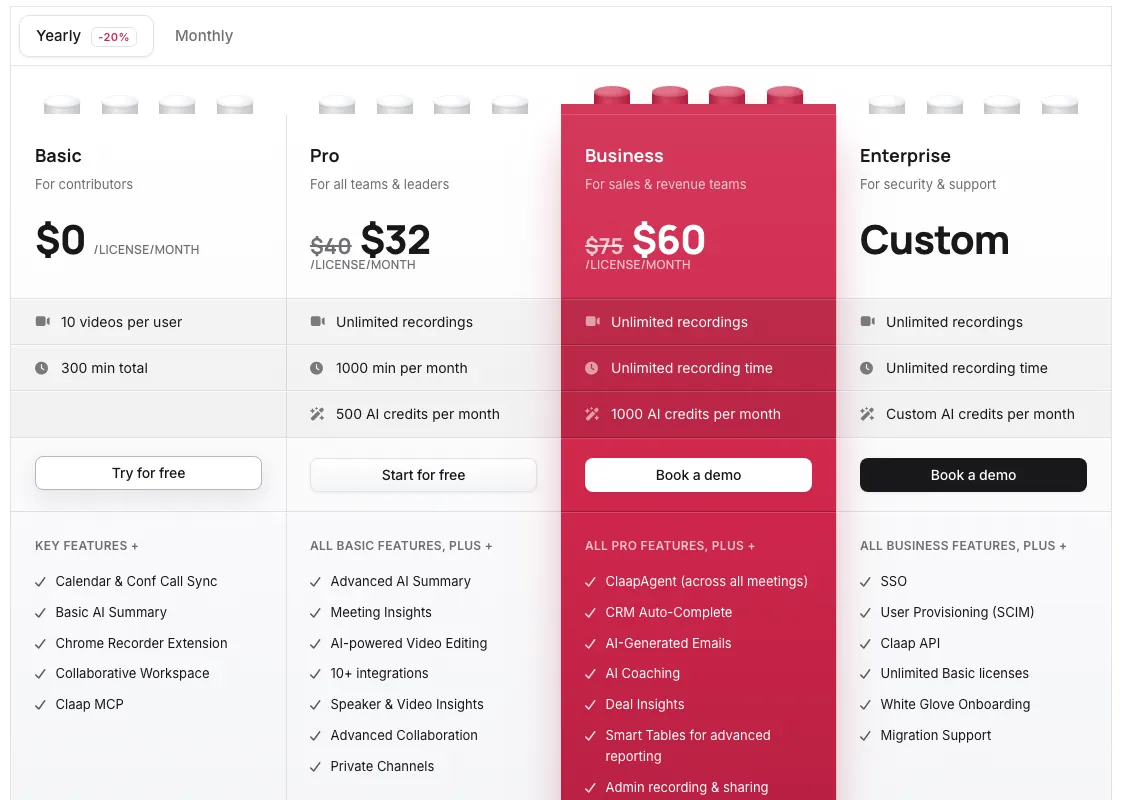
| Plan | Monthly | Annual (per mo) | Metering | Key features |
|---|---|---|---|---|
| Basic | $0 | — | 10 videos/user, 300 min total, 5-license cap | Calendar sync, basic AI summary, Chrome extension |
| Pro | $40/mo | $32/mo | 1,000 min/mo, 500 AI credits/seat | Advanced summaries, video editing, 10+ integrations |
| Business | $75/mo | $60/mo | Unlimited minutes, 1,000 AI credits/seat | CRM auto-complete, AI-generated emails, coaching, deal insights |
| Enterprise | Custom | Custom | Unlimited | SSO, SCIM, API, white-glove onboarding |
That $40-to-$75 range sits well above every other tool in this guide: Granola’s paid tier costs $14 a seat, Fireflies’ entry tier costs $18, and Fathom’s individual tier costs $20. The gap makes sense once you factor in what Business actually includes, a CRM, AI-written emails and coaching metrics, features none of the general-purpose notetakers attempt. It also means Claap isn’t the pick for a solo user just looking for clean notes.
What the ratings actually show
G2 puts Claap in strongly positive territory, 4.6 to 4.7 out of 5, though sources disagree on the exact review count (304 versus 487); either way, it’s a meaningful sample in the hundreds. Trustpilot shows 1 out of 5, but that score comes from a single review, not a real sample size, and shouldn’t be weighed against G2’s hundreds of reviews as if it were. Capterra shows no reviews at all despite Claap appearing in its directory. Judge Claap on the G2 range, which is both larger and more representative of the full user base.
Where it frays
The feature set earns real praise, but recurring complaints follow a pattern: slow uploads and occasional processing delays during playback, a Mac-only desktop app that locks out Windows-first teams entirely, and AI summaries reviewers call “helpful, not flawless,” especially in fast or cross-talking conversations where context gets flattened. Paid-tier trials route through “contact sales” rather than a self-serve button, a heavier sales motion than the other three tools in this guide use for their own upgrade flow.
Who should buy it
Claap fits sales and revenue teams on Mac who want CRM auto-fill, AI coaching and deal insights built into the same tool that takes their notes, and who have budget for a price well above general-purpose competitors. It’s a poor fit for solo users, freelancers or Windows-first teams: Granola costs a third as much and skips the bot the same way Claap does, Fireflies and Fathom both run self-serve trials without a sales call, and all three work on Windows. Compare the full field in Best AI Meeting Note Takers.
Pricing note: Claap's pricing page shows USD and EUR figures side by side; USD is the primary figure here for a US audience. Basic is free forever, no card required, and covers 10 videos per user and 300 minutes of total recording time, capped at 5 basic licenses per workspace. Pro runs $40/mo per seat, or $32/mo billed annually (20% off), and raises the cap to 1,000 recording minutes a month plus 500 AI credits per seat, with advanced summaries, meeting insights and video editing. Business runs $75/mo per seat, or $60/mo annually, and adds ClaapAgent, CRM auto-complete, AI-generated follow-up emails, deal insights and coaching tools. Enterprise is custom-priced with SSO, SCIM and white-glove onboarding. Pro and Business trials route through 'contact sales' on the pricing page, which doesn't state whether a card is required.
Frequently asked questions
How much does Claap cost?
Basic is free forever: 10 videos per user and 300 minutes of total recording time, no card required. Pro runs $40/mo per seat, or $32/mo billed annually, with 1,000 minutes a month and 500 AI credits per seat. Business runs $75/mo per seat, or $60/mo annually, and adds CRM auto-fill, AI-generated follow-up emails and coaching tools. Enterprise is custom-priced.
Does Claap have a free plan?
Yes, called Basic. It's free forever with no credit card required, and covers 10 videos per user and 300 minutes of total recording time across the workspace, capped at 5 basic licenses. That's enough to test the core no-bot recording and AI summary features before paying for Pro or Business.
Is Claap a good fit for a solo freelancer or small business?
Probably not on a paid plan. Pro starts at $40/mo per seat ($32 billed annually), well above general-purpose notetakers in this category, and reviewers specifically cite price sensitivity among small businesses and individual contributors as a recurring complaint. Claap's own pricing page positions its Business tier around sales and revenue teams, not solo users.
Is Claap's 1-star Trustpilot rating something to worry about?
No, and the number itself tells you why: it comes from a single review. One rating cannot represent a product used by hundreds of companies, and it sits next to a G2 score of 4.6 to 4.7 out of 5 across roughly 300 to 500 reviews, a far more meaningful sample. Weigh the G2 range, not the one-review Trustpilot score.
Does Claap work on Windows?
Not as a desktop app. Claap's desktop client is Mac-only, a real gap for Windows-first sales teams and a recurring complaint in reviews. Confirm directly with Claap whether a browser-based workflow covers your use case if a native Windows app is a requirement.
Bottom line
Claap earns a real place among sales teams specifically: no-bot capture, CRM auto-fill and AI coaching aren't features the general-purpose notetakers in this guide try to match, because they're not built for the same buyer. That focus comes at a price. Pro and Business run $40 and $75 a month per seat, roughly double to quintuple the other tools here, and the desktop app shuts out Windows-first teams entirely. Our 3.8 reflects a genuinely strong niche product priced and platform-limited in a way that keeps it from the broader market the other three compete in.
Alternatives in AI Meeting Note Takers

AI meeting notes without a bot in your calls

Real-time noise cancellation for live calls across any app, not a fix for files you've already recorded

Bot or bot-free meeting notes at a low seat price, backed by a review base too thin to call a track record