

Granola review
AI meeting notes without a bot in your calls
Independent review. If you buy through links on this page we may earn a commission, at no extra cost to you. It never changes our scores — how we test.
ToolsGavel verdict
A genuinely well-built notetaker that removes the awkward bot-joins-your-call moment and produces notes that read like something a person wrote. The unresolved consent lawsuit and the thin, unquantified free tier are real reasons to read the fine print before you turn it on for meetings that aren't just your own.
Audited price: $14/mo month-to-month (advertised: $14/user/mo (Business)) — verified 2026-10-30.
Best for: Mac and Windows users who want clean, template-driven meeting notes without a visible recording bot joining the call
Deal 100% off your first month Applied automatically when you sign up through our link. No code needed.
What we liked
- Captures audio straight from your computer's system feed instead of joining as a visible bot, so the call looks like a normal Zoom or Meet window to everyone else on it
- Blends the transcript with whatever you type during the meeting, so your own shorthand shapes the final notes instead of getting buried under a raw AI summary
- Templates plus an MCP connector push structured notes into Notion, HubSpot, Slack, Attio and Claude or Cursor without manual copy-pasting
- G2 reviewers rate it 4.6 out of 5 from 197 reviews (checked 2026-11-08) and consistently mention how little friction it adds to an ordinary meeting
What to watch
- A proposed class-action lawsuit filed in July 2026 in the Northern District of California accuses Granola of recording calls without notifying every participant and using transcripts to train its AI by default unless a user opts out — worth reading up on before you point it at other people's meetings
- Speaker labels depend on the call setup: named tags work in the desktop app on Mac and Windows for Google Meet, Zoom and Microsoft Teams, but everywhere else the transcript shows only "Me" and "Them," and even with tags Granola can't tell people apart on a shared meeting-room device or fully attribute overlapping speech (docs.granola.ai)
- There's no way to play back the original audio for a disputed moment afterward, so you're trusting the transcript rather than verifying it against the recording
- The free Basic plan locks meeting history after 30 days, so older notes sit behind the Business upgrade, while Otter's free tier is capped by minutes rather than by age
How much does Granola really cost?
| Advertised price | $14/user/mo (Business) |
|---|---|
| Real monthly cost, billed annually | No flat rate published |
| Real monthly cost, month-to-month | $14/mo |
| The billing catch | No annual discount is published, it is $14/user/mo either way, and the free Basic plan locks meeting history after 30 days until you upgrade. |
| Permanent free tier | Yes |
| Price last verified | 2026-10-30, against the live pricing page at granola.ai |
Model seats and billing cycles for Granola in the true-cost calculator, or see every audited price in the Pricing Gap Index.
Price watch
Get an email if Granola's price changes
We re-check Granola's pricing on a schedule. If the price, the free plan or a verified deal changes, you get one short email. Nothing else.
What Granola is for
Granola is a meeting notes app for Mac, Windows, iOS and Android that listens to your computer’s system audio during a call instead of dialing into the meeting as a separate bot participant. You type whatever notes you’d normally jot down, in as much or as little detail as you like, and Granola merges that shorthand with the transcript once the call ends, producing a clean write-up rather than a raw wall of text. It syncs with your calendar to prep a brief before external meetings, offers templates for recurring meeting types, and connects to Notion, Slack, HubSpot, Attio and other tools through native integrations or an MCP connector.
Where it shines
The no-bot capture is the feature that gets people talking about Granola, and it holds up in practice. Because it reads audio off your own device rather than joining as a named participant, a Granola call looks identical to any other Zoom or Meet window, with nothing announcing that notes are being taken. Blending your typed notes with the transcript is the second half of what makes it useful: you write “follow up on pricing” mid-call, and Granola expands that into a fuller note using what was actually said around it, rather than replacing your judgment about what mattered with a generic summary. Templates and the MCP connector carry that output into Notion, HubSpot, Slack, Attio and coding tools like Claude Code or Cursor, so notes don’t dead-end in a standalone app. Review volume is still modest, but it’s consistently strong: 4.6 out of 5 from 197 reviews on G2, with reviewers repeatedly calling out how little it changes about how a meeting actually feels.
Where it frays
The honest complication is consent. Granola’s own marketing has leaned on the fact that other people in a call won’t know it’s there, and a proposed class-action lawsuit filed in July 2026 in the Northern District of California argues that’s exactly the problem: the complaint alleges Granola built the app around invisible recording and, by default, used meeting transcripts to train its AI unless a user manually opted out. Granola does document two transparency settings, a chat notification when transcription starts and a video watermark, and the case is still pending. We couldn’t confirm either is on by default, so check your own settings before the first external call. Two-party consent states like California require every participant to agree to a recording, and a tool that hides the fact one is happening makes that easy to get wrong without meaning to.
Functionally, the biggest gap is speaker separation, and it is narrower than it used to be. On Google Meet, Zoom and Microsoft Teams desktop calls, Granola’s speaker tags put each participant’s name from the meeting app above their lines. Outside those setups, the transcript falls back to “Me” (your microphone) and “Them” (everyone else’s system audio). Granola can’t tell apart several people talking through one room device, and overlapping speech may not be fully attributed. There’s also no way to replay the original audio afterward: if a transcript line looks off, you have no recording to check it against, only the text Granola generated. And the free Basic plan keeps meeting history for 30 days, per Granola’s own pricing page as of October 2026, after which older notes lock; Otter’s free tier is limited by minutes instead, which some users will find the more workable cap.
Who should buy it
Granola fits people who take a lot of one-on-ones or small internal meetings on a Mac or Windows machine and want notes that read naturally instead of a machine-generated transcript summary. The $14/user/month Business plan is worth it once you’re actually pushing notes into Notion, HubSpot or Slack rather than just reading them back yourself; the free Basic plan is a fair way to find that out first. If you also want AI help outside of meetings, something like Wispr Flow covers voice dictation in every other app you type into.
Skip Granola, or at least hold off, if most of your calls include people outside your own company and you’re not comfortable manually enabling its consent notification every time, or if you regularly run calls from a shared conference-room device or outside Meet, Zoom and Teams, where speaker labels collapse to Me and Them. A bot-based tool that announces itself, even with the extra friction that comes with it, is the safer default for meetings where not everyone in the room works for you.
What do users say about Granola?
Our summary of public reviews on G2, checked November 8, 2026. These are user opinions, not our test results.
 G2
What users praise
- Ease of use and how easily it fits into a daily routine, G2's most-tagged pros.
- Bot-free capture: one October 2026 G2 review is headlined "Bot-free meeting notes that work in Canadian French".
- Clean, intuitive note-taking (Note-taking and Intuitive tags on G2).
What users complain about
- Complaints are rare in G2's tags; the few name integration gaps, limited language support and occasional AI inaccuracy.
- Consent: because nothing visibly joins the call, one November 2026 Trustpilot reviewer objected that people can be recorded without being told.
G2 tags only a small share of Granola's 197 reviews, and Trustpilot has just 2, so treat these themes as directional.
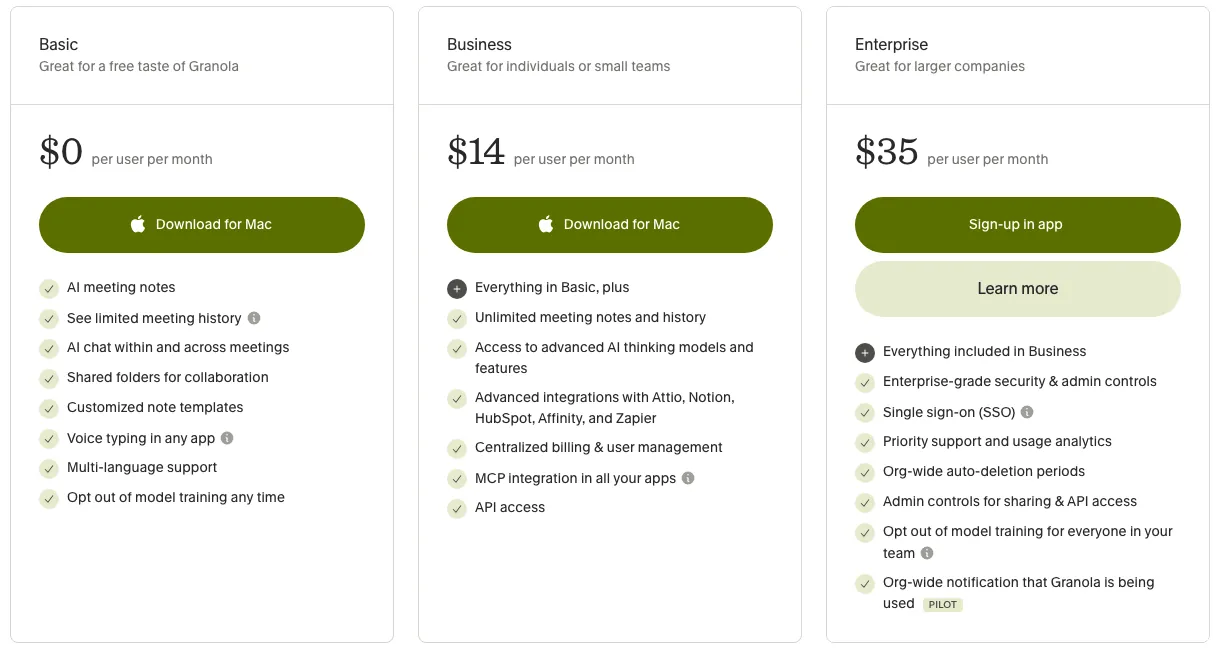
Pricing note: Basic is free forever: AI notes, an AI chat over your past notes, shared folders, templates and multi-language support, with meeting history visible for 30 days per Granola's own pricing page comparison chart, after which older notes lock away until you upgrade. Business runs $14 per user per month for unlimited notes and history, more capable AI models, real integrations (Attio, Notion, Slack, HubSpot, Affinity, Zapier), an MCP connector and API access. Enterprise is $35 per user per month and adds SSO, priority support, org-wide auto-deletion controls and admin-level sharing controls. Billing is monthly per seat; Granola's pricing page doesn't advertise an annual discount the way most SaaS tools do.
Granola promo code and discounts
Signing up through our link applies 100% off your first month automatically — no code to enter. Verified November 3, 2026 .
We only list codes and deals issued to ToolsGavel or published by Granola itself. If a coupon site shows a bigger Granola discount, check that Granola confirms it before you count on it. How we verify codes.
Frequently asked questions
Is Granola worth it?
For solo users and small teams on Mac or Windows who take a lot of meetings and want notes that read like their own shorthand rather than a raw transcript dump, yes. The free Basic plan is real enough to test that before paying, and Business at $14/user/month earns its keep once you need the Notion, HubSpot or Slack integrations. It's a harder yes if you routinely record meetings with people outside your own team, given the pending consent lawsuit.
Does Granola have a free plan?
Yes, called Basic. It includes AI notes, AI chat over your history, shared folders, templates and multi-language support at $0. The catch is meeting history: Granola's pricing page caps Basic at 30 days, after which older notes lock until you upgrade to Business at $14 per user per month.
Is Granola safe to use, or does it record meetings without consent?
Granola captures your computer's system audio directly rather than joining as a bot, which means there's no visible indicator telling other participants they're being recorded unless you turn one on. Granola's help center documents two transparency settings, an automated chat notice and a video watermark (Settings > Preferences > Transparency), but a class-action complaint filed in July 2026 alleges the company designed the app around that invisibility and used call data for AI training by default. If you're recording anyone outside your own team, check your state's consent laws and turn on the notification feature.
How does Granola compare to Otter and Fireflies?
Otter joins meetings as a visible bot participant and works across more platforms, including a web app. Fireflies does the same by default, though its Mac and Windows desktop app can also record without a bot (speakers then appear as Speaker 1 and Speaker 2). Granola only runs from an installed Mac, Windows, iOS or Android app and skips the bot entirely. Otter's free plan gives a clearer monthly minute allowance, and Fireflies leans harder into integrations and automation. Granola's edge is the blended typed-plus-transcript notes and templates, but you pay $14/month to unlock the integrations that make it a real workflow tool rather than a standalone notepad.
Bottom line
A genuinely well-built notetaker that removes the awkward bot-joins-your-call moment and produces notes that read like something a person wrote. The unresolved consent lawsuit and the thin, unquantified free tier are real reasons to read the fine print before you turn it on for meetings that aren't just your own.
Compare Granola



Alternatives in AI Meeting Note Takers

Real-time noise cancellation for live calls across any app, not a fix for files you've already recorded

Bot or bot-free meeting notes at a low seat price, backed by a review base too thin to call a track record

Bot-free meeting notes built for sales teams, priced well above general-purpose notetakers