

Wispr Flow review
AI voice dictation that works in every app
Independent review. If you buy through links on this page we may earn a commission, at no extra cost to you. It never changes our scores — how we test.
ToolsGavel verdict
A fast way to write by voice across your whole computer, and the easier pick for teams that need SSO, HIPAA controls or zero setup. For one person it costs more than Superwhisper ($15 a month against $8.49, with no lifetime option), needs an internet connection, and competes with free built-in dictation. See our Wispr Flow vs Superwhisper page for the full comparison.
Audited price: $12/mo billed annually , $15/mo month-to-month (advertised: $15/user/mo (Pro, billed monthly), $12/user/mo billed annually) — verified 2026-10-30.
Best for: Writers, founders and support staff who'd rather talk than type and want it to work the same way in every app
What we liked
- Dictation lands in virtually any text field system-wide, cleaned up automatically with filler words stripped and punctuation fixed
- The Free plan gives you 2,000 desktop words a week, enough to test it on real work before paying
- Supports 100+ languages with mid-sentence code-switching, useful if you regularly mix languages
- Command Mode lets you rewrite, translate or edit selected text by voice, so you rarely need to touch the keyboard for cleanup
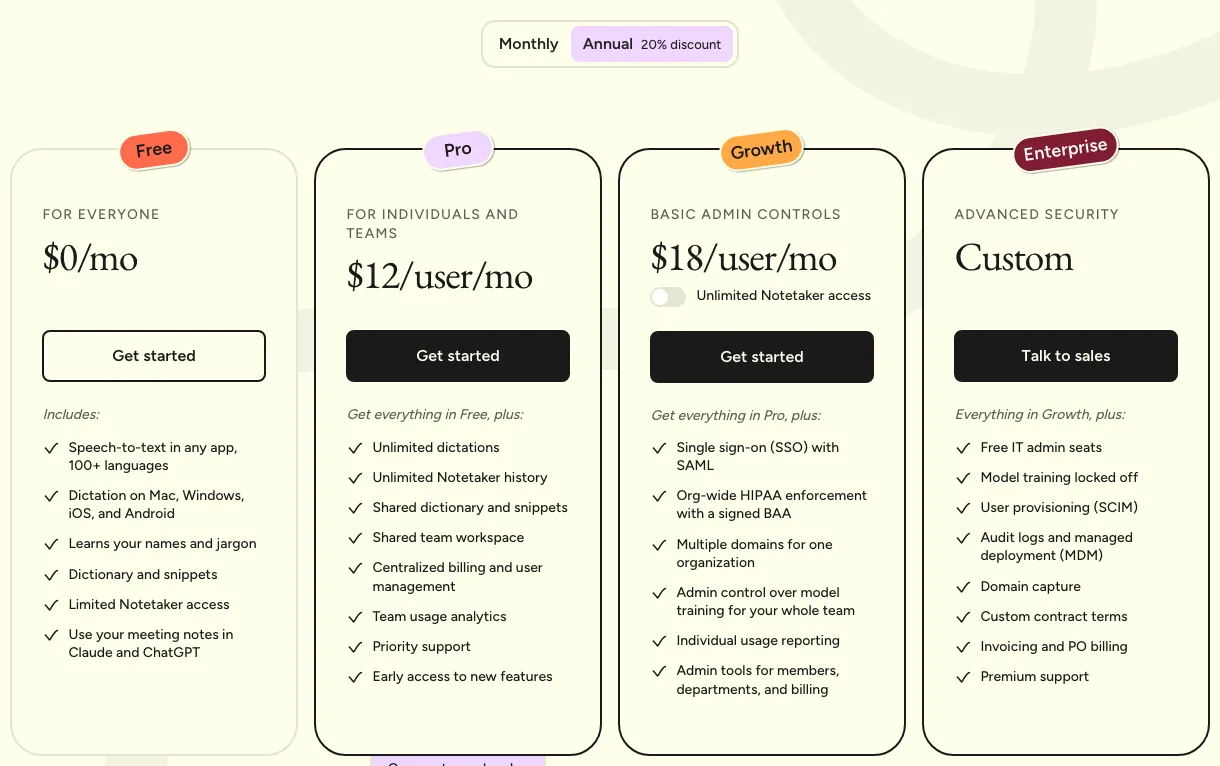
- A Growth tier now adds SSO/SAML and org-wide HIPAA enforcement at $23/mo, a cheaper compliance entry point than jumping straight to a custom Enterprise quote (wisprflow.ai/pricing)
What to watch
- Cloud-only: everything you say is processed on Wispr's servers, so anyone with strict local-only or offline requirements should look elsewhere
- Trustpilot removed Wispr Flow's profile entirely in September 2026 for a guidelines breach, not just a low score; the page read around 2.7 out of 5 from 37 reviews just before it came down, and the same accuracy-after-trial complaint that drove that score is worth checking for yourself (Trustpilot)
- G2 rates it 4.5/5, but from only 16 reviews, too thin to treat as a confident signal next to the iOS App Store's 4.8 rating from a much larger pool (G2, iOS App Store)
- Transcription only works online, there is no lifetime option, and the app's idle memory footprint is heavier than a typical menu-bar utility
How much does Wispr Flow really cost?
| Advertised price | $15/user/mo (Pro, billed monthly), $12/user/mo billed annually |
|---|---|
| Real monthly cost, billed annually | $12/mo |
| Real monthly cost, month-to-month | $15/mo |
| Month-to-month premium | +25% over the annual-billing rate |
| The billing catch | Trustpilot removed Wispr Flow's profile in September 2026 for a guidelines breach; before that it read 2.7/5, citing accuracy that drops once the free trial ends. |
| Permanent free tier | Yes |
| Price last verified | 2026-10-30, against the live pricing page at wisprflow.ai |
Model seats and billing cycles for Wispr Flow in the true-cost calculator, or see every audited price in the Pricing Gap Index.
Price watch
Get an email if Wispr Flow's price changes
We re-check Wispr Flow's pricing on a schedule. If the price, the free plan or a verified deal changes, you get one short email. Nothing else.
What Wispr Flow is for
Wispr Flow is a speech-to-text app that sits in the background on Mac, Windows, iOS and Android and turns talking into typing in whatever app has focus — Gmail, Slack, a code editor, a random web form. Press a hotkey, speak, and it inserts formatted text where your cursor sits, rather than a wall of raw transcription. A separate Meeting Notetaker, on Mac and Windows, records calls and attaches speaker labels to the transcript.
Where it shines
The app-agnostic part actually works. Because Flow types into whatever’s focused rather than living inside one app, you get the same dictation whether you’re drafting an email or filling in a support ticket, and it auto-edits as it goes — stripping filler words, fixing punctuation, adjusting tone to match where the text is landing. Command Mode extends that further: select text and ask, by voice, to rewrite it, shorten it or translate it, without reaching for the keyboard. Language coverage is broad too, with 100+ languages and code-switching mid-sentence, which matters if your work mixes languages day to day. The free plan isn’t a crippled trial either. 2,000 words a week on desktop is enough to know within a few days whether the habit sticks.
Where it frays
Everything you dictate goes to Wispr’s servers before it comes back as text, so anyone with hard offline or local-processing requirements needs a different tool; competitors like Superwhisper offer that option, Flow doesn’t. Responsiveness in daily use runs closer to a second or two than instant, fine for dictating a paragraph at a time, noticeable if you’re expecting live word-by-word feedback. And the review picture got worse, not just uneven: Trustpilot removed Wispr Flow’s profile entirely in September 2026 for a guidelines breach, with the page reading around 2.7 out of 5 from 37 reviews just before it came down, and a recurring complaint there was that accuracy drops once the free trial ends. G2 shows 4.5/5 but from just 16 reviews, and the iOS App Store still shows 4.8 from a much larger pool, which suggests the mobile experience is more polished than desktop right now. Refunds are discretionary: the terms of service promise them only where the law requires.
Who should buy it
Buy it if you dictate enough, long emails, docs, support replies, that formatted, cleaned-up text beats typing, and you’re comfortable with a cloud-based tool. Try the free plan first rather than jumping straight to Pro; it’s generous enough to answer the “does this actually save me time” question honestly. Skip it if voice data leaving your device is a dealbreaker, or if your dictation needs are light enough that your OS’s built-in tool already covers them for free. See how it compares to Superwhisper, Willow Voice and VoiceOS in our best AI dictation apps guide.
Pricing note: The Free plan is a real product, not a demo: 2,000 words a week on Mac and Windows (refilling every Sunday), across Mac, Windows, iOS and Android. Wispr does not publish a mobile word limit, and its help center says allowances can differ by account. Pro removes the word caps and adds a larger Meeting Notetaker allowance, priority support and early feature access for $15/mo monthly or $12/mo billed annually (about $144/year). A Growth tier sits between Pro and Enterprise at $23/mo monthly or $18/mo billed annually, adding SSO/SAML, org-wide HIPAA enforcement with a signed BAA, multiple domains per org, admin control over model training and individual usage reporting. The pricing page lists unlimited Notetaker on Growth, but Wispr's plan docs also show a separate Growth-with-Notetaker price of $33/mo ($312/yr), so confirm what your plan includes at checkout. Enterprise is quoted separately and adds free IT admin seats, SCIM provisioning, audit logs, MDM and custom contracts. New accounts get a 14-day trial by default (longer through referral or student offers), and students get 50% off Pro.
Frequently asked questions
Is Wispr Flow worth it?
If you write or message enough that dictation saves you real time, yes. The free plan alone (2,000 words a week on desktop) is enough to find out before you pay. Pro earns its $12–15/mo mainly once the word cap starts getting in the way or you want a bigger Meeting Notetaker allowance.
Does Wispr Flow have a free plan?
Yes. The Free plan is permanent, not a trial, with 2,000 words a week on Mac and Windows. Wispr does not publish a mobile limit. New accounts also get a 14-day trial of paid features by default (30 days through a referral, 90 for students).
How does Wispr Flow compare to built-in dictation or Superwhisper?
Windows Voice Access and macOS Dictation are free and process speech on-device, so they win on privacy and cost, but their formatting and app-awareness lag behind. Superwhisper is cheaper ($8.49/mo or $249.99 lifetime), works offline and keeps audio on your device with local models. Wispr Flow's edge is zero setup, the auto-editing, tone matching and Command Mode, and a self-serve path to SSO and HIPAA for teams, at the cost of a subscription and cloud-only processing. See our Wispr Flow vs Superwhisper comparison, or our best Wispr Flow alternatives if you are leaving for a specific reason such as price, offline use, Android or Linux.
Can I get a refund on Wispr Flow?
Case by case. The help center describes full, prorated or no refunds through support, while the terms of service say refunds are issued only where required by law. Use the trial first and ask support before you cancel or delete your account.
Bottom line
A fast way to write by voice across your whole computer, and the easier pick for teams that need SSO, HIPAA controls or zero setup. For one person it costs more than Superwhisper ($15 a month against $8.49, with no lifetime option), needs an internet connection, and competes with free built-in dictation. See our Wispr Flow vs Superwhisper page for the full comparison.
Compare Wispr Flow
Alternatives in AI Dictation & Voice Typing

Voice dictation plus voice-triggered automation across apps, not just speech-to-text

AI dictation with a one-time lifetime license, not just a subscription

AI dictation that price-matches Wispr Flow, with a less restrictive free tier