

Restream review
Multistreaming to several destinations at once, with clip generation and webinar hosting sold as paid add-ons rather than bundled
Independent review. If you buy through links on this page we may earn a commission, at no extra cost to you. It never changes our scores — how we test.
ToolsGavel verdict
Restream is the one tool in this comparison where Trustpilot, G2 and Capterra all agree, 4.5 to 4.6 out of 5 across the board, with no large cross-platform gap to explain away. A usable free plan and a $19/mo entry tier make it an easy one to test. The two things to budget for separately are webinar hosting and clip generation, both paid add-ons on top of any plan rather than included features.
Audited price: $19/mo billed annually , $19/mo month-to-month (advertised: $19/mo (Standard, billed monthly or annually)) — verified 2026-10-30.
Best for: Small businesses and creators who want to go live to several platforms at once from a usable free plan, and who don't mind paying separately if they also want webinar hosting or clip generation
What we liked
- The only tool in this guide where Trustpilot doesn't lag G2 and Capterra: 4.5 on G2 (83-84 reviews), 4.6 on Capterra (407 reviews) and 4.6 on Trustpilot (504 reviews), all landing in the same tight band (G2 / Capterra / Trustpilot)
- A genuinely usable free plan, 2 simultaneous channels, no card required, for anyone testing multistreaming before paying (restream.io/pricing)
- Standard's $19/mo entry price sits in the same range as StreamYard's $18.99/mo Essential plan, and Restream's free tier offers one more simultaneous channel than StreamYard's (2 vs. 1) (restream.io/pricing)
- Capterra sub-scores lead on ease of use (4.6) and customer service (4.5), with an 8.9-out-of-10 likelihood-to-recommend score (Capterra)
- Dual-format streaming, vertical and horizontal at once, ships from the Professional tier up, useful for repurposing one live session across platforms with different aspect ratios (restream.io/pricing)
What to watch
- A recurring complaint describes being charged after cancelling, with Restream's first response reportedly offering "Restream credit" rather than a cash refund; the stated refund policy only covers a first purchase cancelled within 7 days and excludes renewals (Trustpilot)
- Webinar hosting isn't a plan feature, it's a paid add-on starting at $99/mo for 100 attendees on top of a Standard or Professional plan, which can push the real cost above a dedicated webinar platform's entry price (restream.io/pricing)
- A minority of reviews mention frozen video or setup complexity; not the dominant theme, but present (Capterra)
- G2's review count is small for a tool this established, 83 to 84 reviews depending on the source, well behind its own Capterra and Trustpilot sample sizes (G2)
How much does Restream really cost?
| Advertised price | $19/mo (Standard, billed monthly or annually) |
|---|---|
| Real monthly cost, billed annually | $19/mo |
| Real monthly cost, month-to-month | $19/mo |
| Month-to-month premium | +0% over the annual-billing rate |
| The billing catch | Restream advertises a 20% annual discount, but Standard's $228/yr total divides to the same $19/mo as paying monthly, so no dollar savings for prepaying a year is confirmed. |
| Permanent free tier | Yes |
| Price last verified | 2026-10-30, against the live pricing page at restream.io |
Model seats and billing cycles for Restream in the true-cost calculator, or see every audited price in the Pricing Gap Index.
Price watch
Get an email if Restream's price changes
We re-check Restream's pricing on a schedule. If the price, the free plan or a verified deal changes, you get one short email. Nothing else.
Restream sends one live source to multiple destinations at once, YouTube, Facebook, LinkedIn, Twitch and others, from a single browser-based setup. Recording, storage and seats scale by tier, while clip generation and webinar hosting are both sold as separate paid add-ons rather than bundled into the core plans. Pricing starts free (2 simultaneous channels, no card) and runs $19 to $239 a month across three self-serve tiers, with a custom Enterprise plan above that. G2 rates it 4.5 out of 5 from 83 to 84 reviews, Capterra 4.6 from 407, and Trustpilot 4.6 from 504, as of October 2026, the one tool in this comparison where all three scores agree.
What Restream is for
The core job is multistreaming: one camera feed, one browser tab, live on several platforms simultaneously. Guest channels and remote-guest streaming are available from Standard up, and Professional adds dual-format streaming, publishing a vertical and a horizontal version of the same stream at once, useful for a creator who wants a native-feeling clip on both YouTube and a short-form platform without a second setup. Recording is tier-gated too: 10 hours per stream on Standard with 15-day storage, up to 4K recording on Professional with 30-day storage. Clip generation and webinar hosting sit outside all of that, priced and purchased separately.
What you get on each plan
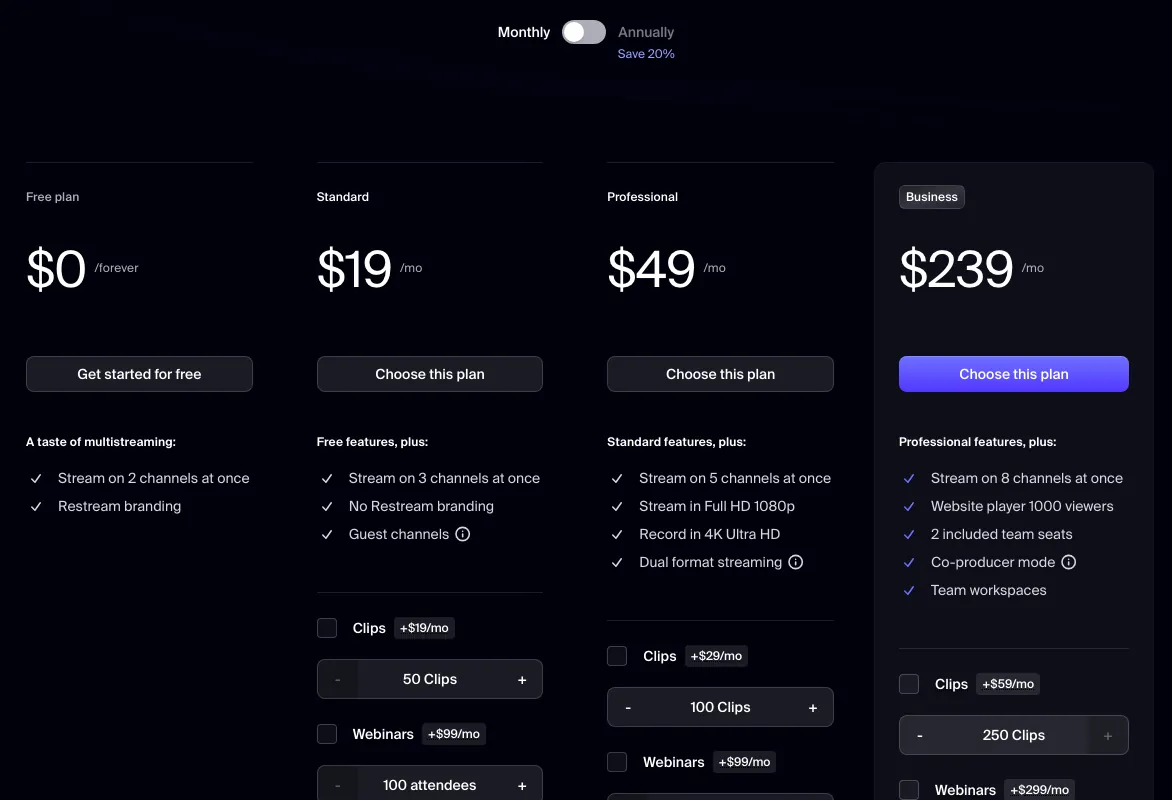
| Plan | Monthly | Annual | Channels | Recording | Storage | Seats |
|---|---|---|---|---|---|---|
| Free | $0 | — | 2 | — | — | 1 |
| Standard | $19 | $228/yr | 3 | 10 hrs/stream | 15 days | 1 |
| Professional | $49 | $588/yr | 5 | Up to 4K | 30 days | 2 |
| Business | $239 | $2,868/yr | 8 | — | — | 2 included |
Add-ons, on top of any paid plan:
| Add-on | Standard | Professional | Business |
|---|---|---|---|
| Clips | +$19/mo (50 clips) | +$29/mo (100 clips) | +$59/mo (250 clips) |
| Webinars | +$99/mo (100 attendees) | +$99/mo (100 attendees) | +$299/mo (500 attendees) |
A buyer who wants both multistreaming and webinar hosting should add the base plan plus the Webinars add-on together before comparing the total against a dedicated webinar platform’s own entry price.
What users say in reviews
Restream stands out in this comparison for a reason that has nothing to do with features: its three review scores actually agree with each other.  G2 sits at 4.5 out of 5,
 Capterra at 4.6, and
 Trustpilot at 4.6, with Capterra’s sub-scores leading on ease of use (4.6) and customer service (4.5) and an 8.9-out-of-10 likelihood-to-recommend figure. The recurring complaint, where one exists, is about cancellation: users report being charged for a full extra period after cancelling, with Restream’s first response reportedly offering account credit rather than a cash refund, and the stated refund policy only covering a first purchase cancelled within 7 days.
Who should skip it
Skip Restream if webinar hosting is your main need rather than a bonus; the $99-to-$299/mo add-on cost stacks on top of a base plan, and Livestorm or WebinarJam both sell webinar hosting as the core product instead of a paid extra. Skip it too if a browser-based production studio with heavier visual polish matters more than multistreaming itself; StreamYard leans further into that. For straightforward multistreaming at the lowest friction, with review scores that hold up across every platform checked, Restream is a reasonable default. The full comparison, with a badge for each use case, is in Best Live Streaming and Webinar Software.
Pricing note: Restream runs four self-serve tiers plus a custom Enterprise plan. Free costs $0, no card: 2 simultaneous channels, 1 seat, with Restream branding on the stream. Standard runs $19/mo, or $228 billed annually: 3 simultaneous channels, 10 hours of recording per stream, 15-day storage, 1 seat. Professional runs $49/mo, or $588 billed annually: 5 channels, 1080p streaming with recording up to 4K, 30-day storage, 2 seats, and dual-format streaming (vertical and horizontal at once). Business runs $239/mo, or $2,868 billed annually: 8 channels, a 1,000-viewer website-embed player, co-producer mode, and 2 seats included. Enterprise is custom and quote-only. All paid tiers remove the Free plan's Restream branding. Two paid add-ons stack on top of any plan: Clips, from $19/mo for 50 clips on Standard up to $59/mo for 250 on Business, and Webinars, from $99/mo for 100 attendees on Standard or Professional up to $299/mo for 500 attendees on Business.
Frequently asked questions
How much does Restream cost?
Free is $0 for 2 simultaneous channels. Standard runs $19/mo ($228 billed annually) for 3 channels and 10 hours of recording per stream. Professional runs $49/mo ($588 annually) for 5 channels, 4K recording and 2 seats. Business runs $239/mo ($2,868 annually) for 8 channels and a 1,000-viewer embed player. Enterprise is custom.
Does Restream have a free plan?
Yes, no credit card required: 2 simultaneous channels and 1 seat, with Restream branding on the stream. Upgrading to any paid tier removes the branding.
Can I host webinars on Restream?
Only as a paid add-on, not a plan feature. The Webinars add-on starts at $99/mo for 100 attendees on Standard or Professional, rising to $299/mo for 500 attendees on Business. If webinar hosting is your main need rather than a bonus, Livestorm and WebinarJam sell it as the core product instead; see Best Live Streaming and Webinar Software.
How does Restream compare to StreamYard?
Pricing lands close: Restream's Standard is $19/mo against StreamYard's Essential at $18.99/mo, and Restream's free plan allows one more simultaneous channel (2 vs. 1). Restream's review scores are more consistent across G2, Capterra and Trustpilot, where StreamYard's Trustpilot rating is disputed between two very different readings. StreamYard's advantage is a browser studio with more production polish and, at its top tier, cloud-based separate audio tracks for recording.
Are Restream's reviews trustworthy, given how review platforms often disagree?
More than most tools in this category. Restream is the one tool in this comparison where Trustpilot's score (4.6/5, 504 reviews) actually matches G2 (4.5/5) and Capterra (4.6/5) instead of running well below them, which is the more common pattern among its peers.
Bottom line
Restream is the one tool in this comparison where Trustpilot, G2 and Capterra all agree, 4.5 to 4.6 out of 5 across the board, with no large cross-platform gap to explain away. A usable free plan and a $19/mo entry tier make it an easy one to test. The two things to budget for separately are webinar hosting and clip generation, both paid add-ons on top of any plan rather than included features.
Alternatives in Live Streaming & Webinars

Credit-based webinar hosting billed in annual packs, metered by unique attendees rather than storage or session count

Browser-based live production studio with no software install, plus local and cloud recording layered on top as paid-tier features

Self-serve webinar hosting with marketing automation built in, checkout available at every tier including the top one