

Viktor review
AI employee that executes real work inside Slack and Microsoft Teams
Independent review. If you buy through links on this page we may earn a commission, at no extra cost to you. It never changes our scores — how we test.
ToolsGavel verdict
A genuinely capable AI agent for lean teams that need finished work, not chat answers, delivered inside Slack or Teams. A 2026-11-08 check puts Trustpilot at 4.4 out of 5 from 74 reviews, backing up the already-strong G2 numbers, which is why this review's score moves up slightly to 4.0. Budget past the $50 sticker price though; reviewers consistently land closer to $150 to $400 a month once real use starts, and you are committing to Slack or Teams as the only door in.
Audited price: $50/mo month-to-month (advertised: $50/mo (20,000 credits)) — verified 2026-10-30.
Best for: Solo founders and lean teams who want an AI agent inside Slack or Teams that finishes real tasks, not just chats about them
Deal $50 off for new users Applied automatically when you sign up through our link. No code needed.
What we liked
- Finishes multi-step work end to end, pulling from tools like Salesforce, Stripe, Google Ads or GitHub in one run and returning a finished report, dashboard or pull request instead of a chat reply
- Lives directly inside Slack or Microsoft Teams, so there is no separate app to learn, and most reviewers report being productive within minutes of connecting
- 3,200+ integrations with no per-seat pricing, so adding teammates to a workspace does not multiply the bill
- Unused credits roll over for a month, and the $100 trial credit carries no card requirement or time limit until it is spent
- Trustpilot shows 4.4 out of 5 from 74 reviews, which lines up with G2's 4.8 out of 5 from 121 reviews (Trustpilot and G2, 2026-11-08)
What to watch
- Credit pricing is opaque. Viktor does not publish a per-credit dollar rate, and G2 reviewers report real monthly spend of $150 to $400, well past the $50 entry tier, once daily use kicks in
- No standalone app or web dashboard. Slack or Microsoft Teams is mandatory, so teams on Google Chat, Discord or email-first workflows are locked out entirely
- Security certification is still catching up. Only SOC 2 Type I is complete; Type II and ISO 27001 are listed as in progress, so regulated industries should ask for the NDA report first
How much does Viktor really cost?
| Advertised price | $50/mo (20,000 credits) |
|---|---|
| Real monthly cost, billed annually | No flat rate published |
| Real monthly cost, month-to-month | $50/mo |
| The billing catch | Credit pricing is opaque with no published per-credit rate, and independent reviews report real spend of $150 to $400 a month once daily use begins. |
| Permanent free tier | No |
| Price last verified | 2026-10-30, against the live pricing page at viktor.com |
Model seats and billing cycles for Viktor in the true-cost calculator, or see every audited price in the Pricing Gap Index.
Price watch
Get an email if Viktor's price changes
We re-check Viktor's pricing on a schedule. If the price, the free plan or a verified deal changes, you get one short email. Nothing else.
What is Viktor AI in Slack?
Viktor is an AI agent that lives inside Slack or Microsoft Teams and does the actual work instead of just answering questions about it, pitching itself as “not a tool, a hire.” Point it at a task and it writes and runs code in its own cloud workspace, builds and deploys a small web app, opens a pull request, triages a bug, reconciles data across systems, or pulls numbers from several connected tools and hands back a finished report or dashboard. It connects to more than 3,200 integrations and runs on credits rather than seats, so a workspace pays for usage instead of headcount.
How much does Viktor cost?
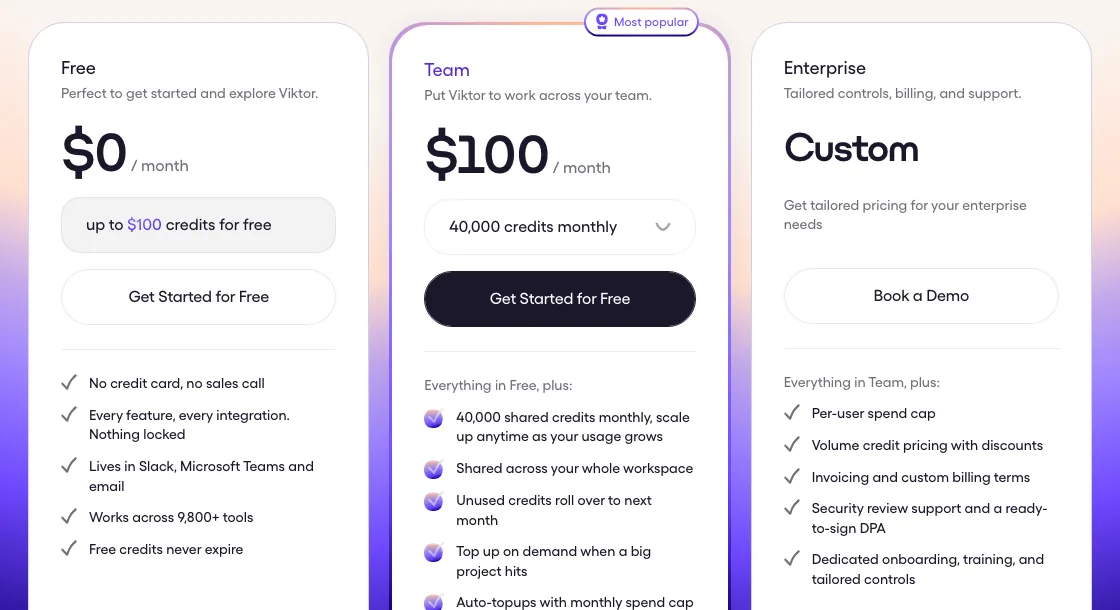
Viktor starts at $50 a month for 20,000 credits, with no permanent free plan, only a one-time $100 trial credit for new workspaces. Paid tiers scale to $300/mo for 125,000 credits and $750/mo for 300,000 credits, Viktor’s most-popular plan, then into custom Enterprise pricing cited at up to $5,000/mo starting around 2,000,000-plus credits. Billing is per workspace, not per seat, so adding teammates doesn’t raise the price on its own.
The catch is that the sticker price undersells real usage. Independent reviews from eesel AI and The AI Agent Index put actual monthly spend at $150 to $400 once a team runs Viktor daily, because a single complex workflow can burn 2,000 to 5,000 credits in one go and Viktor hasn’t published a per-credit dollar rate to help estimate cost ahead of time. Unused credits roll over for one month only, so budget for the $750/mo tier if daily use is the plan rather than the $50 entry price.
Where it shines
The end-to-end execution is the real selling point. Instead of drafting an email you still have to send or a script you still have to run, Viktor queries something like Salesforce, Stripe, Google Ads and GitHub in a single pass and delivers a finished PDF, dashboard or pull request. Because it lives natively in Slack or Teams, there is no separate login or interface to learn, and most reviewers say they were productive within minutes of connecting it, which matters for a small team without time to onboard another platform. A direct check on 2026-11-08 puts it at 4.4 out of 5 from 74 reviews on Trustpilot, which lines up with G2’s 4.8 out of 5 from 121 reviews. Pricing carries no per-seat charge either, so pulling a few more teammates into the workspace does not automatically raise the bill the way most SaaS tools do, and unused credits carry over for a month instead of disappearing at the billing cycle.
Where it frays
The credit system is the catch, and it shows up in review after review. Viktor has not published what a credit actually costs in dollars, so the $50-a-month, 20,000-credit entry tier reads cheaper than it turns out to be. Independent reviews put real spend at $150 to $400 a month for teams that use it daily, since one complex workflow alone can burn 2,000 to 5,000 credits. A G2 reviewer running high support-ticket volume calculated that per-interaction pricing would blow through a monthly budget in about a day and a half at 7,000 to 8,000 tickets, a useful reminder that Viktor is built for finishing discrete projects, not replacing a high-volume support queue. The platform lock-in is real too. There is no web app or standalone dashboard, so teams outside Slack or Microsoft Teams cannot use it at all, and on the compliance side, only SOC 2 Type I is complete, with Type II and ISO 27001 still listed as in progress, which will matter to regulated buyers.
Who should buy it
Buy Viktor if your team already lives in Slack or Teams and you want an agent that can take a task like “pull last month’s ad spend and email me a summary” and actually finish it using your existing tools, not just describe how you’d do it. It fits solo founders and lean ops teams best, the people G2 and Trustpilot reviewers describe most often. Skip it, or at least model your usage first, if you run high daily ticket or task volume where credit costs compound fast, if your team sits outside Slack and Teams, or if you need finished compliance certifications today rather than “in progress.” For a more hands-on, design-it-yourself alternative, Lindy gives you a visual builder instead of an agent that plans its own steps. See the full comparison, including Fyxer and Runable, in Best AI Assistants for Work.
What do users say about Viktor?
Our summary of public reviews on G2 and Trustpilot, checked November 8, 2026. These are user opinions, not our test results.
 G2
 Trustpilot
What users praise
- Time saved on routine work: Trustpilot's review summary says reviewers consistently credit it with streamlining daily tasks and boosting productivity.
- Team adoption: recent five-star Trustpilot reviews (November 2026) describe whole teams using it, for jobs from research to outlines and scripts.
What users complain about
- Credit burn: the most specific 1–2 star complaint (October 2026) is how fast tasks use up credits, with one reviewer calling it a "hungry token monster".
- Two November 2026 reviews say it failed at basic tasks or stopped being useful after the first experiments.
- One October 2026 reviewer says setup stopped at a payment-details step, which conflicts with Viktor's no-card trial credit; check this before you start.
G2 shows no pros and cons tags for Viktor yet, so the themes above come from Trustpilot reviews.
Pricing note: New workspaces get $100 in one-time trial credit with no card required; it doesn't expire while it sits unused, but it is not a renewing free plan, once it's spent you're on a paid tier. Paid tiers start at $50/mo for 20,000 credits, scale to $300/mo for 125,000 credits and $750/mo for 300,000 credits (Viktor's most-popular tier), then into custom Enterprise plans, cited at up to $5,000/mo starting around 2,000,000-plus credits. Pricing is workspace-based with no per-seat charges, and unused credits roll over for one month only. Independent reviews (eesel AI, The AI Agent Index) put real-world spend at $150 to $400 a month once a team uses Viktor daily, well past the $50 headline, because a single complex workflow can burn 2,000 to 5,000 credits on its own. A 2026-11-08 check shows Trustpilot at 4.4/5 from 74 reviews, consistent with G2's 4.8/5 from 121 reviews.
Viktor promo code and discounts
Signing up through our link applies $50 off for new users automatically — no code to enter. Verified November 3, 2026 .
We only list codes and deals issued to ToolsGavel or published by Viktor itself. If a coupon site shows a bigger Viktor discount, check that Viktor confirms it before you count on it. How we verify codes.
Frequently asked questions
Is Viktor worth the money?
For a small team that needs an agent to actually finish tasks, pull data from tools like Stripe or GitHub and hand back a usable report, yes. For occasional use or simple Q&A, the credit-based pricing makes it an expensive way to get answers you could get elsewhere for less.
Does Viktor have a free plan?
Not a permanent one. New workspaces get $100 in trial credit with no card required, and that credit does not expire while it sits unused, but once it runs out you are on a paid tier starting at $50 a month for 20,000 credits.
How much does Viktor cost?
Four published tiers: $50/mo for 20,000 credits, $300/mo for 125,000 credits, and $750/mo for 300,000 credits (Viktor's most-popular tier), then custom Enterprise plans cited at up to $5,000/mo starting around 2,000,000-plus credits. Pricing is per workspace, not per seat, and unused credits roll over for one month.
How much do teams actually pay for Viktor?
More than the $50 headline once you use it daily. Independent reviews report real spend of $150 to $400 a month for active teams, since a single complex workflow can consume 2,000 to 5,000 credits and Viktor has not published a straightforward per-credit dollar rate.
Is Viktor better than Lindy?
They solve overlapping problems differently. Lindy is a no-code builder for wiring multi-step automations yourself, with agents you assemble step by step. Viktor works more like a hire you give a task to inside Slack or Teams, and it plans its own steps using its integrations. Lindy suits teams that want to design and control the workflow; Viktor suits teams that would rather describe the outcome and let it work.
Bottom line
A genuinely capable AI agent for lean teams that need finished work, not chat answers, delivered inside Slack or Teams. A 2026-11-08 check puts Trustpilot at 4.4 out of 5 from 74 reviews, backing up the already-strong G2 numbers, which is why this review's score moves up slightly to 4.0. Budget past the $50 sticker price though; reviewers consistently land closer to $150 to $400 a month once real use starts, and you are committing to Slack or Teams as the only door in.
Alternatives in AI Assistants & Agents

AI inbox assistant that drafts replies and tracks meeting follow-ups

One subscription bundles seven AI "employees," but Trustpilot's billing complaints are the worst in this category

Budget AI agent that plans, builds and automates tasks across chat apps, without a demonstrated inbox or calendar feature