
Zapier review
The biggest workflow automation library, billed by task with the steepest overage multiplier of the three
Independent review. If you buy through links on this page we may earn a commission, at no extra cost to you. It never changes our scores — how we test.
ToolsGavel verdict
Zapier earns its reputation as the easiest way into workflow automation: the biggest app library, a workable free plan and native Tables, Forms and AI tooling mean a non-technical team can have something running the same afternoon. The expense shows up once volume grows, 750 tasks for $29.99/mo is thin for a business running several automations daily, and the 1.4-1.5 Trustpilot score is a real buyer-protection warning. Set a cancellation reminder before any annual renewal, because the complaints cluster almost entirely around billing, not the product itself.
Audited price: $19.99/mo billed annually , $29.99/mo month-to-month (advertised: $19.99/mo (Professional, billed annually)) — verified 2026-10-30.
Best for: Non-technical teams who want the broadest app library and the easiest first automation, and who will set a renewal reminder before any annual billing date
What we liked
- The largest integration library in this comparison by a wide margin, 9,000-plus connected apps, which is Zapier's structural moat against Make's 3,000-plus and n8n's native-plus-HTTP approach (zapier.com/pricing)
- Easiest onboarding for non-technical buyers: two-step Zaps work on the free plan with no code, and the AI-assisted builder lowers the bar further than Make's denser visual canvas or n8n's node-and-JSON model (Zapier verification record, 2026-10-30)
- Deepest native feature bundle of the three: Tables, Forms, Interfaces and Agents are built in, so fewer third-party tools are needed to finish a workflow end to end (zapier.com)
- Strong day-to-day reliability once a workflow is built, reflected in a 4.5 out of 5 G2 score from 1,818 reviews and 4.7 out of 5 on Capterra from 3,048 reviews (G2 / Capterra)
- The free plan needs no credit card and covers unlimited Zaps, Tables and Forms, just capped at two steps and 100 tasks a month (zapier.com/pricing)
What to watch
- Most expensive per task of the three main tools at SMB volume: $29.99/mo buys only 750 tasks, and the price climbs fast past that (zapier.com/pricing)
- The free plan is two-step only, a real limit next to Make's free plan (unlimited steps, just credit-metered) and n8n's free self-hosted tier (also unlimited steps) (zapier.com/pricing)
- A severe, well-documented billing and cancellation complaint pattern on Trustpilot, 1.4 to 1.5 out of 5 from around 299 reviews, concentrated on auto-renewal and refund disputes rather than automation quality (Trustpilot)
- A 2.5x monthly overage multiplier is steep if usage is unpredictable; the 1.25x annual rate is friendlier but locks in a year up front (zapier.com/pricing)
How much does Zapier really cost?
| Advertised price | $19.99/mo (Professional, billed annually) |
|---|---|
| Real monthly cost, billed annually | $19.99/mo |
| Real monthly cost, month-to-month | $29.99/mo |
| Month-to-month premium | +50% over the annual-billing rate |
| The billing catch | Exceeding the 750-task monthly allowance costs 2.5x the per-task rate on monthly billing or 1.25x on annual billing, and Trustpilot's score centers on auto-renewal billing disputes. |
| Permanent free tier | Yes |
| Price last verified | 2026-10-30, against the live pricing page at zapier.com |
Model seats and billing cycles for Zapier in the true-cost calculator, or see every audited price in the Pricing Gap Index.
Price watch
Get an email if Zapier's price changes
We re-check Zapier's pricing on a schedule. If the price, the free plan or a verified deal changes, you get one short email. Nothing else.
Zapier connects apps and automates the busywork between them: when something happens in one tool, it triggers an action in another, no code required. It’s built for small businesses and solo operators who want the fastest path from idea to running automation, not for a technical team assembling a custom integration layer. Pricing runs free for 100 tasks a month on two-step Zaps, then from $19.99 to $169-plus a month depending on task volume and billing cycle, metered by tasks rather than by Zap or by step. Zapier connects more than 9,000 apps, the largest integration library of any tool in this comparison. G2 rates it 4.5 out of 5 from 1,818 reviews and Capterra rates it 4.7 out of 5 from 3,048 reviews, as of October 2026; Trustpilot tells a very different story, covered below.
What Zapier is for
A Zap starts with a trigger, something happens in one app, and runs one or more actions in response. The Free plan only allows two-step Zaps (one trigger, one action), which covers plenty of simple use cases but nothing with branching logic. Professional and up unlock multi-step Zaps, Paths for conditional branching, and Filters to stop a Zap partway through if a condition isn’t met. Zapier also bundles native Tables (a built-in database), Forms (lead-capture pages that feed straight into a Zap) and Interfaces (a lightweight app or page builder), so fewer third-party tools are needed to glue a workflow together end to end. “AI by Zapier” adds a natural-language Zap builder, nicknamed Copilot, plus AI-powered fields, and Zapier Agents extends the platform into AI agent building, all running alongside the core Zap model rather than replacing it. Next to Make’s denser visual canvas or n8n’s node-and-JSON approach, this is the version built for someone who has never automated anything before.
What you get on each plan
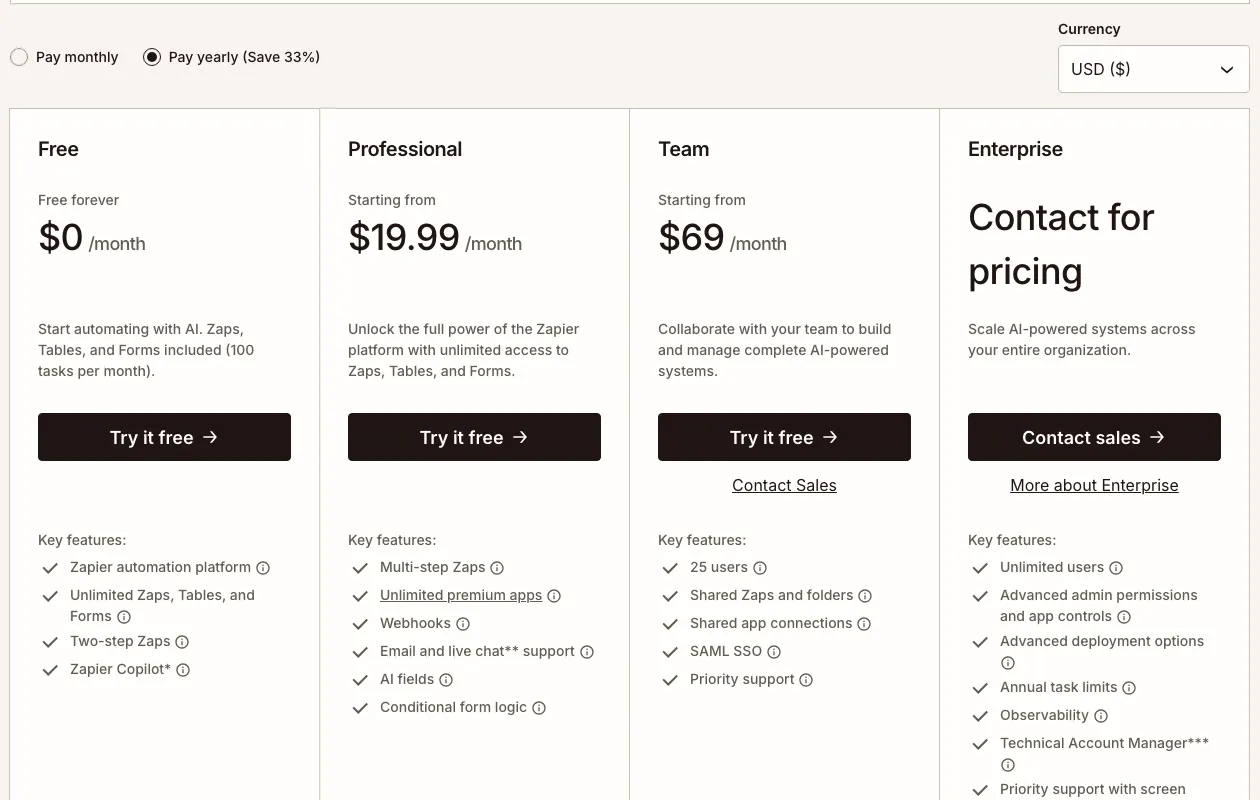
| Plan | Monthly | Annual (per mo) | Tasks | Key limits |
|---|---|---|---|---|
| Free | $0 | $0 | 100 | Two-step Zaps only, unlimited Zaps/Tables/Forms, no card |
| Professional | $29.99+ | $19.99+ | 750 (scales to 2,000,000) | Multi-step Zaps, Paths, Filters, webhooks, AI builder |
| Team | $103.50+ | $69.00+ | 2,000 (scales to 2,000,000) | Up to 25 users, shared folders/connections, SAML SSO |
| Enterprise | Custom | Custom | Custom (annual limit) | Unlimited users, SCIM, technical account manager |
Both Professional and Team keep scaling well past their listed starting tier: Professional’s 2,000-task tier runs $73.50/mo monthly or $49/mo annually, and Team’s published tiers go up to $253.50/mo monthly ($169/mo annually) for 10,000 tasks. There’s no published price point between 2,000 and 5,000 tasks on Team, so a business that needs, say, 3,000 or 4,000 tasks a month either pays Professional’s overage rate on top of the 2,000-task price or upgrades to the next full tier.
Tasks, overage and the free plan
The task is Zapier’s only billing unit, and it only counts actions that fire, not triggers. A multi-step Zap with four actions that all run on a single pass through uses four tasks, even though it only ran once. The real cost of a workflow depends entirely on how many actions are chained together, not how many Zaps exist. Exceed the plan’s monthly allowance and monthly billing charges 2.5 times the base per-task rate for every task over the cap; annual billing is gentler at 1.25 times. The Free plan skips overage entirely: hit 100 tasks and Zaps simply stop running until the next billing cycle, with no option to pay for more. Paid plans come with a 14-day free trial that requires a card on file.
What users say in reviews
Zapier’s review scores split hard by platform, and the split has a specific shape worth understanding before trusting any single number.  G2 (4.5 out of 5, 1,818 reviews) and
 Capterra (4.7 out of 5, 3,048 reviews) both reflect active users rating how well Zaps actually run day to day, and those scores are genuinely strong.
 Trustpilot tells a different story: 1.4 to 1.5 out of 5 from around 299 reviews, driven almost entirely by a cluster of billing and cancellation complaints rather than automation quality. Reviewers describe annual renewals charging hundreds of dollars without clear warning, a cancellation flow one reviewer compared to a gym membership, continued billing after a cancellation request was already submitted, and a no-refund policy that holds even when the charge was a billing error. Read both sides together rather than averaging them: the product that runs a Zap reliably and the company’s billing and cancellation process are, by the review record, two different experiences. The practical takeaway is to set a calendar reminder a week before any annual renewal date and confirm the plan is still the right one before it auto-charges.
Who should skip it
Skip Zapier if 750 tasks for $29.99/mo feels thin for the automation volume a business actually runs; Make starts at roughly a third of that price for far more monthly credits, at the cost of a steeper onboarding curve. Skip it too if a developer is on staff and the goal is unlimited automation without a recurring bill; n8n’s free self-hosted Community edition has no execution cap at all, though it trades Zapier’s ease of use for APIs, JSON and real server-maintenance work. Given the concentrated pattern of billing and cancellation complaints on Trustpilot, anyone signing up for an annual plan should mark the renewal date now rather than after a surprise charge. For the full three-way breakdown, see Best Workflow Automation Tools for Small Business.
Pricing note: Zapier runs four plans, each capped by monthly tasks rather than by Zap or by step: one task is consumed by one action that actually fires, so a Zap with several actions burns through tasks fast. Free costs $0 forever: 100 tasks a month, two-step Zaps only (no multi-step automation), unlimited Zaps, Tables and Forms, no credit card required. Professional starts at $29.99/mo billed monthly or $19.99/mo billed annually for 750 tasks, and the same plan scales up to 2,000,000 tasks at a higher price: 1,500 tasks runs $58.50/mo monthly or $39/mo annually, and 2,000 tasks runs $73.50/mo monthly or $49/mo annually. Professional unlocks multi-step Zaps, unlimited premium apps, webhooks, Paths, Filters and Zapier's AI-assisted builder. Team starts at $103.50/mo monthly or $69/mo annually for the same 2,000-task floor, adding up to 25 users, shared Zap folders and connections, and SAML SSO; its published task tiers run higher too, $178.50/mo monthly or $119/mo annually for 5,000 tasks, and $253.50/mo monthly or $169/mo annually for 10,000. Enterprise is custom-priced, with an annual rather than monthly task limit, unlimited users and SCIM provisioning. Go over a plan's task allowance on monthly billing and Zapier charges 2.5x the base per-task rate for every task over; annual billing's overage multiplier is a gentler 1.25x. The Free plan has no overage option at all: hit 100 tasks and automation pauses until the next cycle. Paid plans carry a 14-day free trial, card required.
Frequently asked questions
How much does Zapier cost?
Zapier has four plans. Free is $0 forever for 100 tasks a month on two-step Zaps only. Professional starts at $29.99/mo billed monthly or $19.99/mo billed annually for 750 tasks, scaling up to 2,000,000 tasks at a higher price (2,000 tasks runs $73.50/mo monthly or $49/mo annually, for example). Team starts at $103.50/mo monthly or $69/mo annually for the same 2,000-task floor, plus up to 25 users and SAML SSO. Enterprise is custom-priced with an annual task limit instead of a monthly one. Going over a plan's task allowance costs 2.5x the base rate on monthly billing or 1.25x on annual billing.
Does Zapier have a free plan?
Yes, and it doesn't expire or require a credit card. Free covers 100 tasks a month, unlimited Zaps, Tables and Forms, but only two-step Zaps: no multi-step automation, webhooks or premium apps until you upgrade to Professional.
What counts as a Zapier task?
A task is one action that actually fires inside a Zap. A simple two-step Zap (one trigger, one action) that runs once uses one task; a multi-step Zap with four actions that all fire on a single run uses four tasks, even though the whole thing counted as one Zap execution. Triggers themselves don't consume a task, only the actions that follow do.
Why is Zapier's Trustpilot score so much lower than its G2 score?
G2's 4.5 out of 5 and Capterra's 4.7 out of 5 come from active users rating how well the automation itself works day to day. Trustpilot's 1.4 to 1.5 out of 5 comes almost entirely from a different complaint: auto-renewal charges that arrive without clear warning, cancellation flows reviewers describe as deliberately hard to find, and continued billing after a cancellation request. It's a billing and support-process problem showing up on one review platform, not evidence the automation itself is unreliable, though it's still a real risk worth planning around before an annual renewal date.
Zapier vs Make vs n8n: which should a small business start with?
Start with Zapier if ease of use and app coverage matter more than price per task, since it's the fastest route to a first working automation. Move to Make if the monthly bill at 750 tasks feels thin and the workflow needs branching logic, routers or loops. Consider n8n only if a developer is available to own setup and maintenance, since its free self-hosted tier has no execution cap but real devops labor behind the $0 price tag. See the full breakdown in Best Workflow Automation Tools.
Bottom line
Zapier earns its reputation as the easiest way into workflow automation: the biggest app library, a workable free plan and native Tables, Forms and AI tooling mean a non-technical team can have something running the same afternoon. The expense shows up once volume grows, 750 tasks for $29.99/mo is thin for a business running several automations daily, and the 1.4-1.5 Trustpilot score is a real buyer-protection warning. Set a cancellation reminder before any annual renewal, because the complaints cluster almost entirely around billing, not the product itself.