

Klap review
Clip maker priced by clips exported rather than minutes uploaded, with 9:16 scene-aware reframing and native TikTok, YouTube, Instagram and LinkedIn scheduling
Independent review. If you buy through links on this page we may earn a commission, at no extra cost to you. It never changes our scores — how we test.
ToolsGavel verdict
Klap's clips-per-month pricing is easy to plan around, and the scene-aware reframing and native scheduling do their job day to day. But the review record behind it is thin and inconsistent across G2, Capterra, and Trustpilot, and a recurring billing complaint shows up often enough on Trustpilot that reading those reviews yourself before subscribing is worth the ten minutes.
Best for: Creators who want a flat clips-per-month number to plan around and don't mind doing their own homework on Klap's thin, mixed review record first
Promo code TOOLSGAVEL 30% off your first payment
What we liked
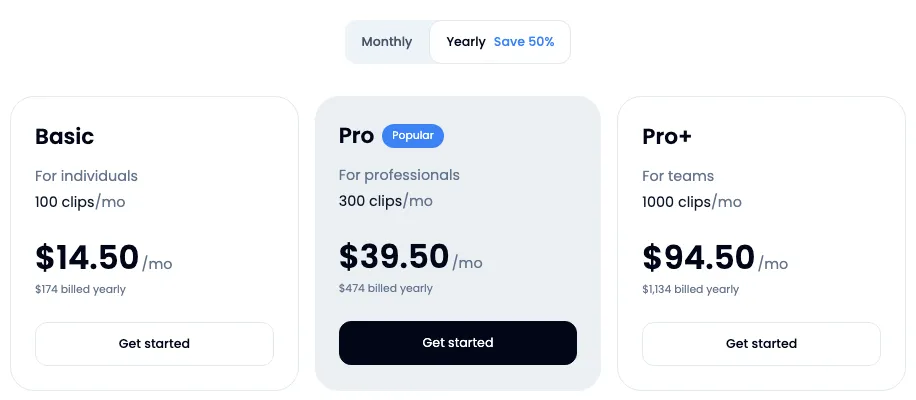
- Meters by finished clips rather than upload minutes, so Basic's 100 clips/mo, Pro's 300, and Pro+'s 1,000 give you a simple monthly output number to plan around (klap.app/pricing)
- AI Reframe 2 detects scene layout, split-screen, screencast, or gaming, before cropping to 9:16, 1:1, or 16:9, rather than applying one blind center-crop to every clip (klap.app)
- Direct scheduling and publishing to TikTok, YouTube, Instagram, and LinkedIn from inside the editor, plus unlimited free clip regenerations on every plan (klap.app)
- Public API plus an MCP server option for teams that want to pipe clip generation into their own tools instead of using Klap's dashboard by hand (klap.app)
What to watch
- Trustpilot sits at 3.6 to 3.7 out of 5 across a thin 40 to 59 reviews, and the most repeated 1-star theme is deceptive billing and cancellation friction, not a scattered one-off complaint (trustpilot.com)
- Klap's own G2 figures contradict each other: one snapshot shows just 2 reviews on an unclaimed profile, while Klap's marketing separately claims '4.7/5 across 600+ reviews.' Neither number is confirmed, so don't take either at face value (g2.com)
- No maximum video length, export resolution, or team-seat count published on the pricing page itself; third-party trackers estimate 45 minutes to 3 hours of upload depending on plan, but Klap hasn't confirmed that directly on its own site (klap.app/pricing)
- The one-video free trial isn't a recurring free tier, and at least one reviewer reports it won't actually let you finish exporting a clip without upgrading first (trustpilot.com)
How much does Klap really cost?
| Starting price | $29/mo ($14.50/mo billed yearly) |
|---|---|
| Permanent free tier | No |
| Price last verified | November 8, 2026, against the live pricing page at klap.app |
Price watch
Get an email if Klap's price changes
We re-check Klap's pricing on a schedule. If the price, the free plan or a verified deal changes, you get one short email. Nothing else.
What Klap is for
Klap turns a long recording, a podcast, a stream, a webinar, into short vertical clips for TikTok, Reels, and Shorts, and it prices that work by how many clips you export each month rather than how many minutes you upload. That’s a different mental model than most of the field: instead of buying upload capacity and hoping it stretches far enough, you buy a clip count directly. Basic’s 100 clips, Pro’s 300, and Pro+‘s 1,000 each map to a real monthly ceiling you can check against your own posting cadence before you pay anything.
Is Klap worth it in 2026?
It depends on how much weight you put on review data versus feature fit. The clip-based pricing is genuinely easier to budget against than a vague credit system, and the reframing engine, AI Reframe 2, does more than a blind crop: it detects whether the source is a split-screen podcast, a screen recording, or gameplay footage, and frames accordingly. Native scheduling to TikTok, YouTube, Instagram, and LinkedIn means you’re not exporting clips just to upload them somewhere else by hand.
The catch is Klap’s track record. G2 shows two contradictory figures that can’t both be true: an unclaimed profile with 2 reviews on one hand, a marketing claim of “600+ reviews” on the other. Capterra’s single review and Trustpilot’s 40-to-59-review sample are both too thin to carry much statistical weight on their own, and the recurring complaint on Trustpilot isn’t about clip quality, it’s about billing and cancellation. That’s a different kind of risk than a feature gap, and it’s worth weighing before you hand over a card number.
Where it shines
The pricing model is the clearest advantage here. Where Vizard sells minutes and Opus Clip gates plans by feature tier without a published minutes number, Klap just sells you clips, a number you can map directly onto your actual posting schedule. The reframing is solid in practice, and the direct-publish integrations save the extra step of exporting and re-uploading to four different apps. Unlimited free regenerations also mean a bad first cut doesn’t cost you anything extra to fix.
Where it frays
Klap’s biggest weakness isn’t a missing feature, it’s confidence in the numbers around it. The pricing page doesn’t state a max video length, export resolution, or team-seat count for any plan, so you’re buying partly on faith for details every competitor in this guide publishes outright. ZIGG SAS, the Paris-based company behind Klap, also hasn’t resolved the gap between its own conflicting G2 figures, and the free trial’s watermark status is disputed between Klap’s marketing and at least one reviewer’s firsthand account. None of that is disqualifying on its own, but stacked together it’s a weaker evidence base than Vizard’s or Submagic’s.
Who should buy it
Buy Klap if a flat clips-per-month number fits how you plan content better than a minutes-or-credits system, and you’re comfortable testing the paid tiers yourself given the thin review data. Skip it, or at least read the Trustpilot billing complaints first, if a confirmed cancellation process matters more to you than a cheap entry price. See how Klap stacks up against the rest of the category in our AI clip maker comparison.
Pricing note: Basic buys 100 clips/mo at $29 monthly or $14.50/mo billed yearly ($174/yr). Pro buys 300 clips/mo at $79 monthly or $39.50/mo yearly ($474/yr), and Pro+ buys 1,000 clips/mo at $189 monthly or $94.50/mo yearly ($1,134/yr), with overage beyond Pro+ handled by a 'Let's talk' sales conversation, not a published rate. Klap meters by clips exported, not by upload minutes, so there's no way to convert its price into a per-minute figure the way you can with Vizard. There's no persistent free plan; Klap offers one free trial video with no credit card, and whether that trial's sample clips carry a watermark is disputed between Klap's own marketing and at least one independent reviewer (klap.app/pricing).
Klap promo code and discounts
Use code TOOLSGAVEL at checkout for 30% off your first payment. Verified November 2, 2026 .
We only list codes and deals issued to ToolsGavel or published by Klap itself. If a coupon site shows a bigger Klap discount, check that Klap confirms it before you count on it. How we verify codes.
Frequently asked questions
How much does Klap cost?
Basic is $29/mo or $14.50/mo billed yearly for 100 clips a month. Pro is $79 monthly or $39.50/mo yearly for 300 clips, and Pro+ is $189 monthly or $94.50/mo yearly for 1,000 clips. Klap meters by clips exported, not upload minutes, so there's no published per-minute rate to compare against tools like Vizard (klap.app/pricing).
Does Klap have a free plan?
No. Klap offers one free trial video with no credit card required, not a recurring free monthly tier. At least one independent reviewer reports that trial sometimes won't let you finish exporting a clip without paying first.
Is Klap good for team use?
Pro+ is marketed 'for teams,' but Klap doesn't publish a specific seat count or team-management feature list on its pricing page, so confirm with Klap directly before buying on that basis.
What languages does Klap support for captions?
Transcription and caption editing support 52 languages, per Klap's own site.
Is Klap trustworthy on billing?
Mixed. Reviewers on Trustpilot cite deceptive billing and cancellation friction as the single most common complaint, and the sample size (40 to 59 reviews) is thin enough that a handful of bad experiences move the score a lot. Read the reviews yourself before entering a card number.
Bottom line
Klap's clips-per-month pricing is easy to plan around, and the scene-aware reframing and native scheduling do their job day to day. But the review record behind it is thin and inconsistent across G2, Capterra, and Trustpilot, and a recurring billing complaint shows up often enough on Trustpilot that reading those reviews yourself before subscribing is worth the ten minutes.
Alternatives in AI Clip Makers

AI clip maker priced on a published 1-credit-equals-1-minute conversion, so you can actually calculate cost per uploaded minute before you buy

AI clip maker that meters in finished videos instead of minutes, with a per-plan length ceiling that stretches to 30 minutes at 4K60 on its Business plan

Established AI clip maker built around a 0-99 Virality Score, a nine-platform scheduler, and credits that roll over two months on its mid-tier plan