

Vizard review
AI clip maker priced on a published 1-credit-equals-1-minute conversion, so you can actually calculate cost per uploaded minute before you buy
Independent review. If you buy through links on this page we may earn a commission, at no extra cost to you. It never changes our scores — how we test.
ToolsGavel verdict
Vizard is the one tool in this category where the per-minute math is actually real, not a guess, and its review footprint backs that up with the largest confirmed Trustpilot sample here. The unpublished mid-tier credit pricing and the tight 3-day free-export window are real limits, but for anyone trying to budget a clip tool against an actual podcast or stream schedule, Vizard gives you the cleanest numbers to work from.
Best for: Podcasters and streamers who want a transparent, calculable per-minute cost and a free plan that lasts longer than a one-off trial
What we liked
- The only tool in this guide that publishes a fixed conversion, 1 credit equals 1 minute of uploaded video, so you can compute a real cost per minute instead of estimating one (vizard.ai/pricing)
- Large, credible review base across every platform checked: Trustpilot 4.7/5 on 2,521 reviews confirmed by a direct read, Capterra 4.9/5 on 433, and G2 4.7/5 (vizard.ai, trustpilot.com)
- AI B-roll insertion is a named, confirmed feature on the homepage, not something quietly folded into another tool the way some competitors handle it (vizard.ai)
- Business adds a brand-template system and extra seats at a flat, published $5/seat/mo, a clear add-on price rather than a custom quote (vizard.ai/pricing)
What to watch
- Free-plan exports expire after just 3 days, and switching from annual to monthly billing roughly doubles the Creator rate, $29 versus $14.50 (vizard.ai/pricing)
- Support responses are described by multiple Trustpilot reviewers as slow and impersonal, without substantive troubleshooting help (trustpilot.com)
- Creator and Business credit allowances are shown as a range, 600 up to 12,000 a month, with the price steps between those numbers not visible on the public pricing page (vizard.ai/pricing)
- Reviewers' most common complaint is that unused credits are forfeited on cancellation with no refund or carryover (trustpilot.com)
How much does Vizard really cost?
| Starting price | $29/mo ($14.50/mo billed yearly) |
|---|---|
| Permanent free tier | Yes |
| Price last verified | November 2, 2026, against the live pricing page at vizard.ai |
Price watch
Get an email if Vizard's price changes
We re-check Vizard's pricing on a schedule. If the price, the free plan or a verified deal changes, you get one short email. Nothing else.
What Vizard is for
Vizard takes long-form video, podcasts, webinars, livestreams, and turns it into short vertical clips for TikTok, Reels, and YouTube Shorts, with automatic 9:16 reframing and auto-captions translatable into 100+ languages. What sets it apart in this category isn’t a unique editing feature, it’s the pricing unit underneath: Vizard is the only tool reviewed here that publishes a fixed 1-credit-equals-1-minute conversion, so you can actually calculate what an uploaded hour costs you before you commit.
Is Vizard worth it in 2026?
Yes, if a calculable cost per minute matters to how you evaluate a tool. Run the math on Creator’s annual rate, $14.50/mo for 600 credits, and you land at roughly $0.024/min, or about $1.45 per uploaded hour, numbers you simply can’t produce for Klap or Opus Clip because neither publishes a fixed conversion. Vizard’s review data backs the product itself: 4.7/5 on Trustpilot across 2,521 reviews, confirmed by a direct read rather than a secondhand claim, plus 4.9/5 on Capterra and 4.7/5 on G2.
The honest gaps are a credit range on Creator and Business, 600 up to 12,000, where the price steps between the low and high end of that range aren’t published, and free exports that expire after just 3 days. If you’re planning to scale well past 600 credits a month, confirm the exact mid-tier pricing with Vizard directly before you commit to a plan.
Where it shines
Transparency is the differentiator. Where Klap meters by clips with no stated max video length, and Kapwing charges variable credits per AI feature with no published credit-to-dollar rate, Vizard gives you one number and sticks to it. AI B-roll insertion is confirmed on the homepage as a named feature rather than something you discover buried in the editor. The free plan, while capped, is a real recurring tier rather than a time-limited trial, so you get to test actual output quality before paying anything.
Where it frays
The free tier’s 3-day export expiry is tight, and switching Creator from annual to monthly billing nearly doubles the price, a common trap across this category but still worth flagging. Vizard’s “Schedule social posts” feature doesn’t state how many platforms it covers, unlike Opus Clip’s named nine-platform scheduler or Submagic’s named four-platform list, so confirm platform coverage directly if that’s a hard requirement. And while the entry credit numbers are clear, the top end of the Creator-to-Business range, up to 12,000 credits a month, isn’t priced transparently on the public page.
Who should buy it
Buy Vizard if you want to run real cost-per-minute math before committing and you’re clipping long-form audio or video regularly enough that the calculation matters. Skip it, or confirm platform coverage directly, if you need to know exactly how many social networks the scheduler reaches before you commit to an annual plan. See how Vizard stacks up against the rest of the field in our AI clip maker comparison.
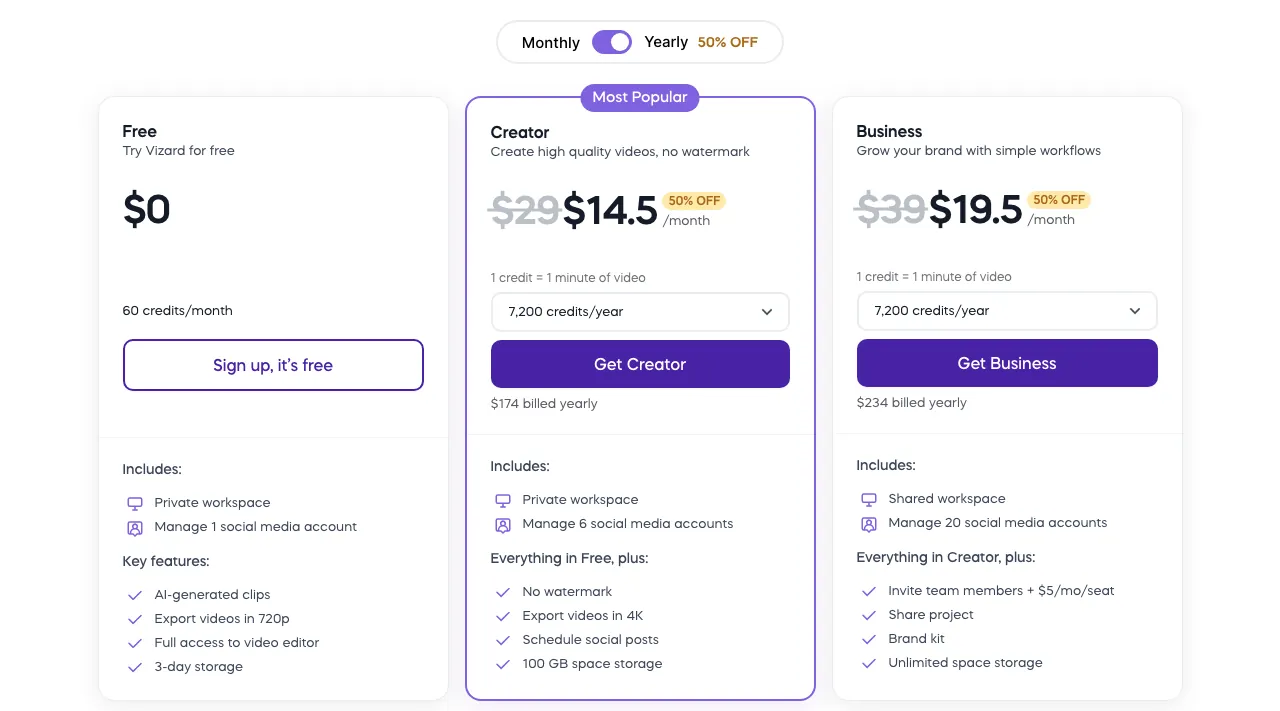
Pricing note: Free gives 60 credits a month, about 60 minutes of upload, a 10-minute export length, 720p output, a watermark, and 3-day storage. Creator starts at 600 credits/mo for $29 monthly or $14.50/mo billed yearly ($174/yr), unlocking 4K export with no watermark, 100GB storage, uploads up to 600 minutes (30GB) per video with exports of any length, 6 social accounts, and a named 'Schedule social posts' feature. Business runs $39/$19.50 for the same 600-to-12,000-credit range, unlimited storage, a brand-kit system, 20 social accounts, and the same scheduler, with extra seats at a flat $5/seat/mo. Vizard publishes a fixed 1 credit = 1 minute of uploaded video unit, so Creator's annual rate works out to roughly $0.024/min, the most calculable price in this category (vizard.ai/pricing).
Frequently asked questions
How much does Vizard cost?
Free covers 60 credits a month (about 60 minutes of upload) with a watermark. Creator starts at $29/mo or $14.50/mo billed yearly for 600+ credits with 4K, no watermark. Business runs $39/$19.50 for the same credit range plus unlimited storage and 20 social accounts (vizard.ai/pricing).
Does Vizard have a free plan without a watermark?
No. Vizard's free plan is real and recurring, not a trial, but it's capped at 60 minutes of upload a month, 720p, and exports carry a watermark. Removing the watermark requires Creator or above.
How does Vizard's pricing compare per minute to other clip makers?
Vizard publishes a fixed 1 credit = 1 minute unit, so Creator works out to about $0.024/min billed annually, roughly $1.45 per uploaded hour. Most competitors in this category, including Klap and Opus Clip, don't publish an equivalent fixed conversion, so a direct comparison only works against Vizard's own number.
Does Vizard auto-post or schedule to social platforms?
Yes. Creator and Business both list a named 'Schedule social posts' feature on the pricing page, alongside 6 social accounts on Creator and 20 on Business. The free plan includes 1 connected account and no scheduling.
Is Vizard good for teams?
Business adds a shared workspace, project link-sharing, and extra seats at $5/seat/mo on top of the base plan, which is one of the more transparent team add-on prices in this category.
Bottom line
Vizard is the one tool in this category where the per-minute math is actually real, not a guess, and its review footprint backs that up with the largest confirmed Trustpilot sample here. The unpublished mid-tier credit pricing and the tight 3-day free-export window are real limits, but for anyone trying to budget a clip tool against an actual podcast or stream schedule, Vizard gives you the cleanest numbers to work from.
Alternatives in AI Clip Makers

AI clip maker that meters in finished videos instead of minutes, with a per-plan length ceiling that stretches to 30 minutes at 4K60 on its Business plan

Clip maker priced by clips exported rather than minutes uploaded, with 9:16 scene-aware reframing and native TikTok, YouTube, Instagram and LinkedIn scheduling

Established AI clip maker built around a 0-99 Virality Score, a nine-platform scheduler, and credits that roll over two months on its mid-tier plan