

Submagic review
AI clip maker that meters in finished videos instead of minutes, with a per-plan length ceiling that stretches to 30 minutes at 4K60 on its Business plan
Independent review. If you buy through links on this page we may earn a commission, at no extra cost to you. It never changes our scores — how we test.
ToolsGavel verdict
Submagic's video-count pricing and its 30-minute-per-video ceiling on Business make it a strong fit for longer source material, and its 4.5/5 Trustpilot score across 857 reviews holds up with a 66% reply rate to negative reviews. The lack of a free plan and a strict no-refund policy on renewals are real friction points worth planning around before your first charge.
Best for: Creators clipping longer source material who want a published videos-per-month number and a higher per-video length ceiling than most competitors offer
What we liked
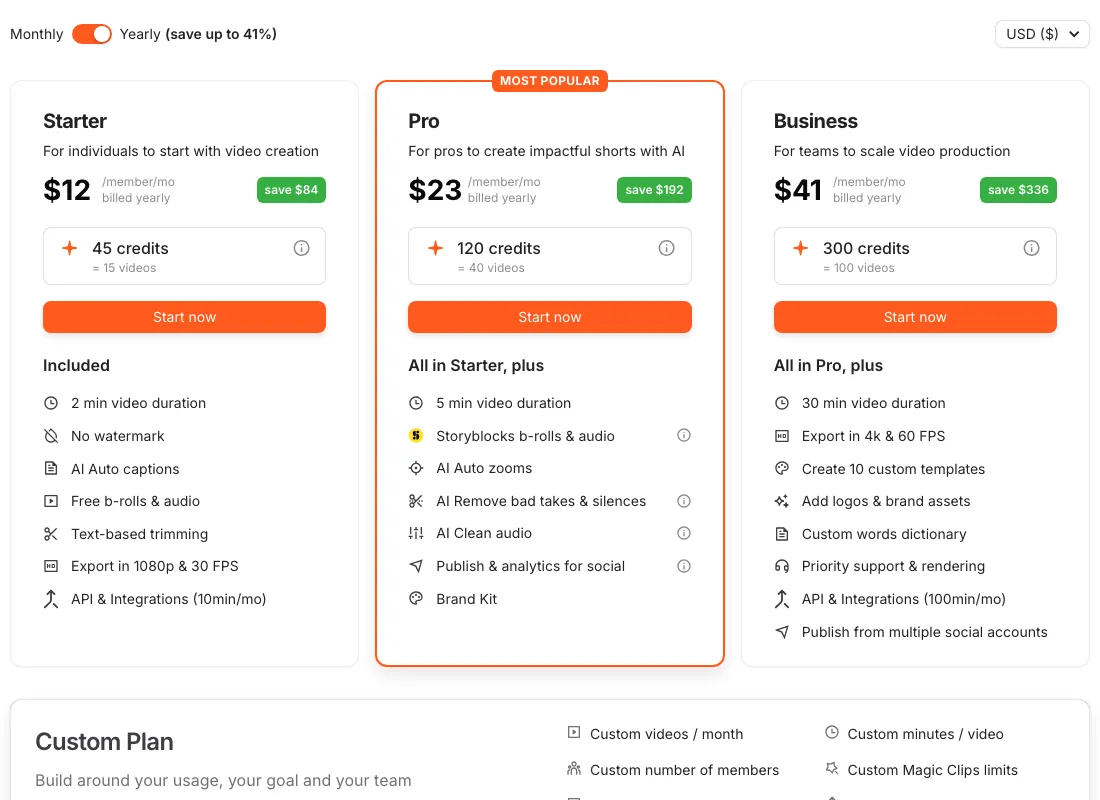
- Plans are metered in finished videos, not minutes or vague credits: Starter buys 15 videos a month, Pro 40, Business 100, a clear monthly ceiling to check against your posting plan up front (submagic.co/pricing)
- Business raises the per-video length cap to 30 minutes at 4K/60fps, well past the 2-minute cap on Starter and the 5-minute cap on Pro (submagic.co/pricing)
- Trustpilot shows 4.5/5 across 857 reviews, and the company replies to 66% of negative reviews (trustpilot.com)
- A separate API add-on, priced down to $0.10/min at the 10,000-minute tier, lets high-volume teams scale past plan credit caps without jumping to a custom quote (submagic.co/pricing)
What to watch
- No free plan at all, trial access only, and the pricing page doesn't state how long that trial runs (submagic.co/pricing)
- The most repeated 1-star complaint is a strict no-refund policy enforced on renewals, described by multiple reviewers as a surprise charge they didn't expect (trustpilot.com, producthunt.com)
- Submagic's privacy policy doesn't say one way or the other whether uploaded video trains its AI models, a gap both Opus Clip and Kapwing close with an explicit statement (submagic.co/privacy)
- Max video length scales sharply with price: the 2-minute cap on the $19 Starter plan rules it out for clipping a 20-minute podcast episode without jumping to Pro or Business first (submagic.co/pricing)
How much does Submagic really cost?
| Starting price | $19/mo ($12/mo billed yearly) |
|---|---|
| Permanent free tier | No |
| Price last verified | November 2, 2026, against the live pricing page at submagic.co |
Price watch
Get an email if Submagic's price changes
We re-check Submagic's pricing on a schedule. If the price, the free plan or a verified deal changes, you get one short email. Nothing else.
What Submagic is for
Submagic turns long recordings into short, captioned clips using automatic cuts, silence removal, and key-moment detection, then adds retention-optimized caption styling, B-roll, auto-zoom, and a direct scheduler for TikTok, Reels, Shorts, and Facebook. The thing that separates it from most of this category is how it meters usage: instead of minutes or an abstract credit count, every plan states a flat number of finished videos a month, along with a hard per-video length cap that scales with price.
Is Submagic worth it in 2026?
Yes, particularly if you’re clipping longer source material and want a clear monthly output number. Business’s 100-video allowance and 30-minute-per-video, 4K/60fps ceiling means a full long-form episode finishes in one pass, well past Opus Clip’s unpublished per-video cap. Vizard accepts longer raw uploads, up to 600 minutes per video on Creator and Business, but that’s a source-material limit for clipping, not a finished-video length cap the way Submagic publishes. Submagic’s review record backs the product itself: 4.5/5 on Trustpilot across 857 reviews, and the company replies to two-thirds of its negative reviews.
The two things to plan around: there’s no free plan at all, just trial access with no stated length, and the most repeated 1-star complaint is a strict, surprise-feeling no-refund policy on renewals. Neither is a product-quality problem, but both affect how comfortable you should be handing over a card before testing the output on your own footage.
Where it shines
Submagic’s length ceiling is the standout here. Opus Clip doesn’t publish a minutes figure for its paid tiers at all, and Klap doesn’t state a max video length either; Submagic states both a video count and a length cap for every plan, up front, which makes budgeting against your actual content far easier. The API add-on pricing, scaling down to $0.10/min at volume, also gives high-output teams a real path to scale without negotiating a custom enterprise quote.
Where it frays
The lack of a free plan is the clearest gap against competitors like Vizard and Kapwing, both of which let you test real output before paying anything. Submagic’s privacy policy also doesn’t address AI training on uploaded video one way or the other, which means you can’t currently point to a confirmed opt-out or no-training statement the way you can for Opus Clip or Kapwing. And the no-refund-on-renewal complaint is frequent enough on both Trustpilot and Product Hunt that it’s worth reading before you set a plan to auto-renew.
Who should buy it
Buy Submagic if you’re clipping podcasts or longer streams and need a per-video length cap that actually fits that material, especially on Business. Skip it, or budget for the trial carefully, if you want to test real output on a genuine free tier before committing a card. See how Submagic stacks up against the rest of the field in our AI clip maker comparison.
Pricing note: No free plan; trial access only, with no stated trial length. Starter is $19/mo or $12/mo billed yearly for 45 credits = 15 videos a month, capped at 2 minutes per video, 1080p/30fps, no watermark. Pro is $39/$23 for 120 credits = 40 videos, up to 5 minutes per video, premium B-roll, and a brand kit. Business is $69/$41 for 300 credits = 100 videos, up to 30 minutes per video, 4K/60fps. A separate API add-on scales from 250 minutes/$57 up to 10,000 minutes/$1,000, dropping to $0.10/min at the top tier (submagic.co/pricing).
Frequently asked questions
How much does Submagic cost?
Starter is $19/mo or $12/mo billed yearly for 15 videos capped at 2 minutes each. Pro is $39/$23 for 40 videos up to 5 minutes. Business is $69/$41 for 100 videos up to 30 minutes at 4K/60fps (submagic.co/pricing).
Does Submagic have a free plan?
No. Submagic offers trial access only, with no free recurring tier and no stated trial length on its pricing page.
How much video does an AI clip generator buy you per month?
On Submagic, it's measured in finished videos rather than minutes: 15 on Starter, 40 on Pro, 100 on Business, each with a different max length per video (2, 5, and 30 minutes respectively).
Which AI clip tool auto-posts to TikTok?
Submagic includes a direct publishing scheduler to TikTok, Instagram Reels, YouTube Shorts, and Facebook, with batch publishing across channels, on every paid plan.
Is Submagic good for long podcast episodes?
Only on Business, where the per-video cap reaches 30 minutes at 4K/60fps. Starter's 2-minute cap and Pro's 5-minute cap make both too short for a full long-form episode in one pass.
Bottom line
Submagic's video-count pricing and its 30-minute-per-video ceiling on Business make it a strong fit for longer source material, and its 4.5/5 Trustpilot score across 857 reviews holds up with a 66% reply rate to negative reviews. The lack of a free plan and a strict no-refund policy on renewals are real friction points worth planning around before your first charge.
Alternatives in AI Clip Makers

AI clip maker priced on a published 1-credit-equals-1-minute conversion, so you can actually calculate cost per uploaded minute before you buy

Clip maker priced by clips exported rather than minutes uploaded, with 9:16 scene-aware reframing and native TikTok, YouTube, Instagram and LinkedIn scheduling

Established AI clip maker built around a 0-99 Virality Score, a nine-platform scheduler, and credits that roll over two months on its mid-tier plan